This useful, fully STL-compliant stable container designed
by Joaquín M. López Muñoz is an hybrid between vector and list,
providing most of the features of vector
except element
contiguity.
Extremely convenient as they are, vectors
have a limitation that many novice C++ programmers frequently stumble upon:
iterators and references to an element of an vector
are invalidated when a preceding element is erased or when the vector expands
and needs to migrate its internal storage to a wider memory region (i.e.
when the required size exceeds the vector's capacity). We say then that
vectors are unstable: by
contrast, stable containers are those for which references and iterators
to a given element remain valid as long as the element is not erased: examples
of stable containers within the C++ standard library are list
and the standard associative containers (set,
map, etc.).
Sometimes stability is too precious a feature to live without, but one particular
property of vectors, element
contiguity, makes it impossible to add stability to this container. So, provided
we sacrifice element contiguity, how much can a stable design approach the
behavior of vector (random
access iterators, amortized constant time end insertion/deletion, minimal
memory overhead, etc.)? The following image describes the layout of a possible
data structure upon which to base the design of a stable vector:
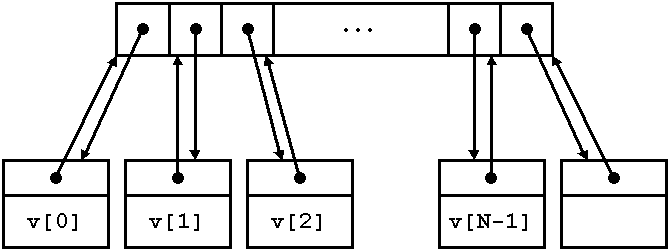
Each element is stored in its own separate node. All the nodes are referenced
from a contiguous array of pointers, but also every node contains an "up"
pointer referring back to the associated array cell. This up pointer is the
key element to implementing stability and random accessibility:
Iterators point to the nodes rather than to the pointer array. This ensures
stability, as it is only the pointer array that needs to be shifted or relocated
upon insertion or deletion. Random access operations can be implemented by
using the pointer array as a convenient intermediate zone. For instance,
if the iterator it holds a node pointer it.p and
we want to advance it by n positions, we simply do:
it.p = *(it.p->up+n);
That is, we go "up" to the pointer array, add n there and then
go "down" to the resulting node.
General properties. stable_vector
satisfies all the requirements of a container, a reversible container and
a sequence and provides all the optional operations present in vector. Like
vector, iterators are random access. stable_vector
does not provide element contiguity; in exchange for this absence, the container
is stable, i.e. references and iterators to an element of a stable_vector
remain valid as long as the element is not erased, and an iterator that has
been assigned the return value of end() always remain valid until the destruction
of the associated stable_vector.
Operation complexity. The big-O complexities
of stable_vector
operations match exactly those of vector. In general, insertion/deletion
is constant time at the end of the sequence and linear elsewhere. Unlike
vector, stable_vector
does not internally perform any value_type destruction, copy/move construction/assignment
operations other than those exactly corresponding to the insertion of new
elements or deletion of stored elements, which can sometimes compensate in
terms of performance for the extra burden of doing more pointer manipulation
and an additional allocation per element.
Exception safety. (according to Abrahams'
terminology) As stable_vector
does not internally copy/move elements around, some operations provide stronger
exception safety guarantees than in vector:
Table 7.1. Exception safety
|
operation
|
exception safety for vector<T>
|
exception safety for stable_vector<T>
|
|
insert
|
strong unless copy/move construction/assignment of T throw (basic)
|
strong
|
|
erase
|
no-throw unless copy/move construction/assignment of T throw (basic)
|
no-throw
|
Memory overhead. The C++ standard does not
specify requirements on memory consumption, but virtually any implementation
of vector has the same behavior
with respect to memory usage: the memory allocated by a vector
v with n elements of type T is
mv = c∙e,
where c is v.capacity()
and e is sizeof(T). c can
be as low as n if the user has explicitly reserved the exact capacity required;
otherwise, the average value c for a growing vector
oscillates between 1.25∙n and 1.5∙n for typical resizing policies.
For stable_vector,
the memory usage is
msv = (c + 1)p + (n + 1)(e + p),
where p is the size of a pointer. We have c + 1 and n + 1 rather than c and
n because a dummy node is needed at the end of the sequence. If we call f
the capacity to size ratio c/n and assume that n is large enough, we have
that
msv/mv ≃ (fp + e + p)/fe.
So, stable_vector
uses less memory than vector
only when e > p and the capacity to size ratio exceeds a given threshold:
msv < mv <-> f > (e + p)/(e - p). (provided e > p)
This threshold approaches typical values of f below 1.5 when e > 5p; in
a 32-bit architecture, when e > 20 bytes.
Summary. stable_vector
is a drop-in replacement for vector
providing stability of references and iterators, in exchange for missing
element contiguity and also some performance and memory overhead. When the
element objects are expensive to move around, the performance overhead can
turn into a net performance gain for stable_vector
if many middle insertions or deletions are performed or if resizing is very
frequent. Similarly, if the elements are large there are situations when
the memory used by stable_vector
can actually be less than required by vector.
Note: Text and explanations taken from Joaquín's
blog
Using sorted vectors instead of tree-based associative containers is a well-known
technique in C++ world. Matt Austern's classic article Why
You Shouldn't Use set, and What You Should Use Instead (C++ Report
12:4, April 2000) was enlightening:
“Red-black trees aren't the only way to organize data that
permits lookup in logarithmic time. One of the basic algorithms of computer
science is binary search, which works by successively dividing a range in
half. Binary search is log N and it doesn't require any fancy data structures,
just a sorted collection of elements. (...) You can use whatever data structure
is convenient, so long as it provides STL iterator; usually it's easiest
to use a C array, or a vector.”
“Both std::lower_bound and set::find take time proportional
to log N, but the constants of proportionality are very different. Using
g++ (...) it takes X seconds to perform a million lookups in a sorted vector<double>
of a million elements, and almost twice as long (...) using a set. Moreover,
the set uses almost three times as much memory (48 million bytes) as the
vector (16.8 million).”
“Using a sorted vector instead of a set gives you faster
lookup and much faster iteration, but at the cost of slower insertion. Insertion
into a set, using set::insert, is proportional to log N, but insertion into
a sorted vector, (...) , is proportional to N. Whenever you insert something
into a vector, vector::insert has to make room by shifting all of the elements
that follow it. On average, if you're equally likely to insert a new element
anywhere, you'll be shifting N/2 elements.”
“It may sometimes be convenient to bundle all of this together
into a small container adaptor. This class does not satisfy the requirements
of a Standard Associative Container, since the complexity of insert is O(N)
rather than O(log N), but otherwise it is almost a drop-in replacement for
set.”
Following Matt Austern's indications, Andrei Alexandrescu's Modern
C++ Design showed AssocVector,
a std::map drop-in replacement designed in his
Loki library:
“It seems as if we're better off with a sorted vector. The
disadvantages of a sorted vector are linear-time insertions and linear-time
deletions (...). In exchange, a vector offers about twice the lookup speed
and a much smaller working set (...). Loki saves the trouble of maintaining
a sorted vector by hand by defining an AssocVector class template. AssocVector
is a drop-in replacement for std::map (it supports the same set of member
functions), implemented on top of std::vector. AssocVector differs from a
map in the behavior of its erase functions (AssocVector::erase invalidates
all iterators into the object) and in the complexity guarantees of insert
and erase (linear as opposed to constant). ”
Boost.Container flat_map,
flat_set, flat_multimap and flat_multiset containers
are ordered, vector-like container based, associative containers following
Austern's and Alexandrescu's guidelines. These ordered vector-like containers
have also benefited with the addition of move
semantics, speeding up insertion
and erasure times considerably. Flat associative containers have the following
attributes:
-
Faster lookup than standard associative containers
-
Much faster iteration than standard associative containers. Random-access
iterators instead of bidirectional iterators.
-
Less memory consumption for small objects (and for big objects if
shrink_to_fit is used)
-
Improved cache performance (data is stored in contiguous memory)
-
Non-stable iterators (iterators are invalidated when inserting and erasing
elements)
-
Non-copyable and non-movable values types can't be stored
-
Weaker exception safety than standard associative containers (copy/move
constructors can throw when shifting values in erasures and insertions)
-
Slower insertion and erasure than standard associative containers (specially
for non-movable types)
Differences with the standard std::flat_map/std::flat_set.
C++23 added std::flat_map, std::flat_set,
std::flat_multimap and std::flat_multiset,
based on the same sorted-vector idea. There are, however, several notable
differences with Boost.Container's long-standing
implementation (available since 2004 and usable from C++03 onwards):
-
Container vs. container adaptor: Boost.Container's flat containers are full-fledged
containers that own a single underlying sorted sequence. The standard
ones are container adaptors layered
on top of user-provided sequence containers, exposed through
keys()/values()
accessors and extract()/replace() operations.
-
Storage layout for maps (array of structs
vs. structure of arrays):
flat_map
stores its elements as a single sequence of value_type
= std::pair<Key, T>,
so each key is interleaved with its mapped value in one contiguous buffer.
std::flat_map instead keeps keys and mapped
values in two separate parallel containers
(key_container_type and
mapped_container_type).
The standard layout can speed up key-only scans (lookups touch only the
keys array) at the cost of an extra indirection when both key and value
are needed, while Boost's layout keeps each key next to its value.
-
Iterators and
value_type:
because flat_map
holds real std::pair<Key, T>
objects, its iterators dereference to actual pair lvalues and &*it
yields a pointer to a stored pair. std::flat_map,
having two arrays, exposes proxy references of type pair<const key_type&,
mapped_type&>
and does not provide pointers into a single pair array.
-
Underlying sequence access: Boost.Container exposes the whole sorted vector
through
sequence_type,
extract_sequence()
and adopt_sequence()
(optionally with the ordered_unique_range_t
tag for an O(1) adoption), which is handy to build the container cheaply
and then re-adopt it. The standard counterpart uses extract()/replace() returning the key and mapped containers
separately.
-
Availability and configurability: Boost.Container's flat containers work from C++03,
let you choose the underlying vector-like sequence (e.g.
small_vector
or static_vector)
through a template parameter and offer additional ordered-range insertion
overloads.
The following example shows the most common operations, the single-sequence
storage and the extract_sequence/adopt_sequence idiom:
#include <boost/container/flat_map.hpp>
#include <boost/move/utility_core.hpp>
#ifdef NDEBUG
#undef NDEBUG
#endif
#include <cassert>
int main ()
{
using namespace boost::container;
typedef flat_map<int, int> map_t;
map_t m;
m.reserve(8);
m[30] = 3;
m[10] = 1;
m[20] = 2;
assert(m.size() == 3);
{
map_t::const_iterator it = m.begin();
assert(it->first == 10 && it->second == 1); ++it;
assert(it->first == 20 && it->second == 2); ++it;
assert(it->first == 30 && it->second == 3);
}
map_t::iterator f = m.find(20);
assert(f != m.end() && f->second == 2);
const map_t::value_type *raw = &*m.begin();
assert(raw[0].first == 10 && raw[2].first == 30);
map_t::sequence_type seq = m.extract_sequence();
assert(m.empty());
m.adopt_sequence(ordered_unique_range_t(), boost::move(seq));
assert(m.size() == 3 && m.find(30) != m.end());
return 0;
}
devector ("double-ended
vector") is a hybrid of the standard vector
and deque containers, originally
written by Benedek Thaler. It offers cheap (amortized constant time) insertion
at both the front and back ends, while also providing the regular features
of vector, in particular
contiguous underlying storage and random access to elements.
What is it for? devector
is the natural choice whenever a program needs a growable sequence that is
frequently modified at both ends but still
requires the elements to live in a single contiguous block of memory. Double-ended
queues (work queues, sliding windows, ring-buffer-like patterns) and parsers
or builders that both prepend and append data are typical examples where
a plain vector would force
expensive shifts at the front and a deque
would give up contiguity.
Relationship with other containers. Like
vector, devector
keeps all its elements in a single contiguous buffer, so it offers random
access, data()-based
interoperability with C APIs and cache-friendly traversal; in fact, devector's available methods
are a superset of those of vector
with similar behaviour, barring a couple of iterator invalidation guarantees
that differ. Unlike vector,
it can reserve free capacity before the
first element as well as after the last one, which makes front insertion
as cheap as back insertion instead of a linear-time operation. Like deque, it provides amortized constant-time
growth at both ends, but unlike deque
it does not use a segmented layout: the price for contiguity is that growing
past the reserved capacity relocates elements, so iterators and references
are invalidated more often than in a deque.
In short, devector
sits between vector and
deque, trading some of deque's iterator-stability guarantees for
vector-like contiguous storage
with efficient two-ended growth.
The static size overhead for boost's devector
is one extra size_t per container:
Usually sizeof(devector)
== 4*sizeof(T*).
There are different strategies when elements are to be inserted at one extreme
of the container and there is no room for additional elements at that extreme.
One simple strategy would be to reallocate a bigger buffer and move all elements
to the new memory. However, this would lead to unbounded memory waste when
elements are inserted predominantly on one extreme (e.g. pushed at one extreme
and popped from the other, like a LIFO pattern).
To avoid unbounded memory waste, Boost.Container's devector
uses a different strategy:
-
If elements are inserted near a extreme and there is free space on that
extreme, the insertion is performed without any additional data movement
(only the elements between the insertion point and the extreme are moved).
-
If elements are inserted near one extreme and the free space on that
extreme is exhausted, all existing elements are relocated (moved) to
the center of the internal memory buffer. This makes room in the exhausted
extreme to insert more elements without allocating a new buffer.
-
Potentially, the maximum number of possible relocations (movements) reusing
the memory buffer are Olog(N), but that would lead non-amortized constant-time
insertion at the extremes. In consequence, the number of relocations
must be limited ('relocation limit') and a reallocation (allocation of
a new memory buffer) will be performed if the load-factor of the container
defined as (
size()/length_of_internal_buffer) surpasses
the relocation limit (see Lars Greger Nordland Hagen's "Double-ended
vector - is it useful?" article for more details).
-
This approach offers a reasonable balance between a reasonable memory
overhead and performance.
However, this strategy has also some downsides:
-
Insertions at the extremes have no strong exception guarantee as data
has to be move inside the existing buffer.
-
Due to the memory relocation vs reallocation strategy explained above:
-
capacity()
can no longer tell the maximum number of elements that the container
can hold and, at the same time, the number of insertions to perform
before a reallocation is performed. Depending on which extreme
a insertion takes place, a reallocation might occur or not (maybe
there is free capacity at that extreme)
-
Instead of removing the
capacity() member or renaming it to "minimum_capacity()",
the definition has been changed to tell the minimum
number of elements that can be inserted without reallocating. This allows
the typical pattern where:
-
If
reserve(n)
is called, capacity() >=
n
-
If
capacity()
== n
it is guaranteed that if size() <=
n no reallocation will
occur.
-
However the usual container invariant where
size() <= capacity()
does not hold. size()
can be bigger than capacity() because elements can be always inserted
at an extreme with free capacity without reallocation.
The following example illustrates the most common operations: efficient insertion
and removal at both ends, random access over contiguous storage and the per-end
reserve_front/reserve_back capacity hints:
#include <boost/container/devector.hpp>
#include <cstddef>
#ifdef NDEBUG
#undef NDEBUG
#endif
#include <cassert>
int main ()
{
using namespace boost::container;
devector<int> dv;
dv.push_back(2);
dv.push_back(3);
dv.push_front(1);
dv.push_front(0);
assert(dv.size() == 4);
assert(dv.front() == 0);
assert(dv.back() == 3);
assert(dv[0] == 0 && dv[3] == 3);
const int *p = dv.data();
for(std::size_t i = 0, n = dv.size(); i != n; ++i)
assert(p[i] == (int)i);
dv.reserve_front(dv.size() + 4);
dv.reserve_back(dv.size() + 4);
dv.emplace_front(-1);
dv.emplace_back(4);
assert(dv.front() == -1);
assert(dv.back() == 4);
dv.pop_front();
dv.pop_back();
assert(dv.size() == 4);
assert(dv.front() == 0);
assert(dv.back() == 3);
return 0;
}
When the standard template library was designed, it contained a singly linked
list called slist. Unfortunately,
this container was not standardized and remained as an extension for many
standard library implementations until C++11 introduced forward_list,
which is a bit different from the the original SGI slist.
According to SGI STL
documentation:
“An slist
is a singly linked list: a list where each element is linked to the next
element, but not to the previous element. That is, it is a Sequence that
supports forward but not backward traversal, and (amortized) constant time
insertion and removal of elements. Slists, like lists, have the important
property that insertion and splicing do not invalidate iterators to list
elements, and that even removal invalidates only the iterators that point
to the elements that are removed. The ordering of iterators may be changed
(that is, slist<T>::iterator might have a different predecessor
or successor after a list operation than it did before), but the iterators
themselves will not be invalidated or made to point to different elements
unless that invalidation or mutation is explicit.”
“The main difference between slist
and list is that list's iterators are bidirectional iterators, while slist's iterators are forward iterators.
This means that slist
is less versatile than list; frequently, however, bidirectional iterators
are unnecessary. You should usually use slist
unless you actually need the extra functionality of list, because singly
linked lists are smaller and faster than double linked lists.”
“Important performance note: like every other Sequence,
slist defines the member
functions insert and erase. Using these member functions carelessly, however,
can result in disastrously slow programs. The problem is that insert's first
argument is an iterator pos, and that it inserts the new element(s) before
pos. This means that insert must find the iterator just before pos; this
is a constant-time operation for list, since list has bidirectional iterators,
but for slist it must
find that iterator by traversing the list from the beginning up to pos. In
other words: insert and erase are slow operations anywhere but near the beginning
of the slist.”
“Slist provides the member functions insert_after and erase_after,
which are constant time operations: you should always use insert_after and
erase_after whenever possible. If you find that insert_after and erase_after
aren't adequate for your needs, and that you often need to use insert and
erase in the middle of the list, then you should probably use list instead
of slist.”
Boost.Container updates the classic slist container with and implements
it a bit differently than the standard C++ forward_list.
forward_list has no size()
method, so it's been designed to allow (or in practice, encourage) implementations
without tracking list size with every insertion/erasure, allowing constant-time
splice_after(iterator, forward_list &,
iterator,
iterator)
-based
list merging. On the other hand slist
offers constant-time size() for those that don't care about linear-time
splice_after(iterator, [classref boost::container::slist slist] &, iterator, iterator)
size()
and offers an additional splice_after(iterator, [classref
boost::container::slist slist] &, iterator, iterator, size_type)
method that can speed up slist
merging when the programmer already knows the size. slist
and forward_list are therefore
complementary.
Differences with the standard std::forward_list.
Both slist and the C++11
std::forward_list are singly linked lists with
forward iterators, push_front,
and the constant-time _after
operations (insert_after,
erase_after, splice_after), so most code looks the same
with either. The relevant differences are:
-
Size tracking:
slist
keeps the element count, so size() is O(1). std::forward_list
deliberately has no size() member, trading the query for a smaller
footprint and for an always-constant-time whole-list splice_after.
-
splice_after
complexity: because slist
must keep its size up to date, the range overload splice_after(pos, x, before_first, before_last) is linear (it has to count the transferred
elements). To recover constant time when the count is already known,
slist adds the extra
overload splice_after(pos, x, before_first, before_last, n), which has no equivalent in std::forward_list.
-
Heritage and interface:
slist
is the continuation of the classic SGI slist
(it predates the standard one), while std::forward_list
is the C++11 standardization of the same idea with a slightly trimmed
interface. Choose slist
when an O(1) size()
or the size-aware merge is convenient, and std::forward_list
when the minimal per-list overhead matters most.
The following example illustrates the most common operations, in particular
the constant-time _after
family (insert_after/erase_after), the use of before_begin()
and the size-aware splice_after:
#include <boost/container/slist.hpp>
#ifdef NDEBUG
#undef NDEBUG
#endif
#include <cassert>
int main ()
{
using namespace boost::container;
typedef slist<int> slist_t;
slist_t l;
l.push_front(3);
l.push_front(2);
l.push_front(1);
assert(l.size() == 3);
assert(l.front() == 1);
slist_t::iterator it = l.begin();
++it;
l.insert_after(it, 20);
assert(l.size() == 4);
l.erase_after(it);
assert(l.size() == 3);
l.insert_after(l.before_begin(), 0);
assert(l.front() == 0);
slist_t other;
other.push_front(6);
other.push_front(5);
slist_t::iterator before_last = other.begin();
++before_last;
l.splice_after(l.before_begin(), other,
other.before_begin(), before_last, other.size());
assert(other.empty());
const int expected[] = { 5, 6, 0, 1, 2, 3 };
int i = 0;
for(slist_t::const_iterator b = l.begin(), e = l.end(); b != e; ++b, ++i)
assert(*b == expected[i]);
assert(l.size() == 6);
return 0;
}
static_vector
is an hybrid between vector
and array: like vector, it's a sequence container with
contiguous storage that can change in size, along with the static allocation,
low overhead, and fixed capacity of array.
static_vector
is based on Adam Wulkiewicz and Andrew Hundt's high-performance varray
class.
What is it for?. static_vector
stores its elements inside the container object itself, so it never performs
dynamic memory allocation. This makes it ideal whenever heap allocation is
undesirable or unavailable but a variable-length, vector-like interface is
still convenient: embedded and realtime systems, hot code paths where allocation
latency matters, fixed-size buffers, and the internal implementation of other
classes are typical examples.
Relationship with other containers. The
number of elements in a static_vector
may vary dynamically up to a fixed capacity because elements are stored within
the object itself, similarly to an array. However, objects are initialized
as they are inserted into static_vector
unlike C arrays or std::array, which must construct all elements
on instantiation. The behavior of static_vector
enables the use of statically allocated elements in cases with complex object
lifetime requirements that would otherwise not be trivially possible. The
key difference with small_vector
is that small_vector
falls back to dynamic storage once its in-place buffer is exhausted, while
static_vector's
capacity is a hard, compile-time bound that is never exceeded.
General properties. Some relevant properties
are:
-
Random access to elements.
-
Constant time insertion and removal of elements at the end.
-
Linear time insertion and removal of elements at the beginning or in
the middle.
-
No dynamic memory allocation, ever:
capacity() and max_size() are fixed at compile time.
-
Like
vector, iterators
and references are invalidated by insertions/erasures that shift elements,
but the storage region itself is never relocated (it lives inside the
object).
Error handling. By default (throw_on_overflow<true>)
trying to insert beyond the fixed capacity throws bad_alloc
(or calls throw_bad_alloc() when exceptions are disabled) instead of
allocating more memory. Out-of-bounds access through at() throws out_of_range.
If throw_on_overflow<false> is configured, inserting beyond capacity
is undefined behavior, trading the safety check for minimum overhead.
Differences with the standard std::inplace_vector.
C++26 added std::inplace_vector, a dynamically-resizable,
fixed-capacity sequence container that stores its elements inside the object,
i.e. the same idea pioneered by static_vector.
The most relevant differences are:
-
Overflow handling:
std::inplace_vector
always throws bad_alloc
when an operation would exceed the capacity, and additionally provides
try_push_back/try_emplace_back (which return a null
pointer instead of throwing when full) and unchecked_push_back/unchecked_emplace_back (undefined behavior
when full). Boost's static_vector
also throws by default, but selects between throwing and undefined behavior
at compile time through the throw_on_overflow
policy of static_vector_options
rather than through distinct member functions.
-
Configurability:
static_vector
can be tuned via static_vector_options
(overflow policy and the integral type used to store the size). std::inplace_vector offers no such customization.
The following example illustrates the most common operations and the fixed-capacity
behavior:
#include <boost/container/static_vector.hpp>
#include <exception>
#ifdef NDEBUG
#undef NDEBUG
#endif
#include <cassert>
int main ()
{
using namespace boost::container;
static_vector<int, 5> sv;
assert(sv.empty());
assert(sv.capacity() == 5);
assert(sv.max_size() == 5);
for(int i = 0; i < 5; ++i)
sv.push_back(i);
assert(sv.size() == 5);
assert(sv.size() == sv.capacity());
assert(sv[0] == 0 && sv[4] == 4);
assert(sv.data()[2] == 2);
#ifndef BOOST_NO_EXCEPTIONS
bool overflowed = false;
try {
sv.push_back(5);
}
catch(const std::exception &) {
overflowed = true;
}
assert(overflowed);
#endif
sv.pop_back();
assert(sv.size() == 4);
return 0;
}
Customization. As with the other Boost.Container
vector-like containers, static_vector
can be tuned through static_vector_options
(the overflow-checking policy described above and the integral type used
to store the size). See the Configurable
static vector section for examples.
small_vector
is a vector-like container optimized for the case when it holds few elements.
It embeds some preallocated, in-place storage for a number N of elements, which allows it to avoid
any dynamic memory allocation as long as the actual number of elements does
not exceed that preallocated threshold. small_vector
is inspired by LLVM's
SmallVector container.
What is it for?. Many programs create a
large amount of short-lived sequences that, the overwhelming majority of
the time, contain just a handful of elements. Using a plain vector in those scenarios means paying
for a heap allocation (and the matching deallocation) on construction/growth
even when only one or two elements are stored, which can dominate the cost
and hurt cache locality. small_vector
addresses this by carrying a small buffer inside the container object itself:
while size()
<= N
no allocation takes place and the elements live next to the container, which
is both faster and more cache-friendly. Typical uses are temporary working
sets, the implementation details of other data structures, parser/AST node
children, small option lists, etc.
Relationship with other containers. Unlike
static_vector,
whose capacity is a fixed compile-time bound, small_vector's
capacity can grow beyond the initial preallocated N:
when the preallocated buffer is exhausted it transparently switches to dynamically
allocated storage, behaving from then on like an ordinary vector.
In other words, static_vector
never allocates (and throws if the fixed capacity is exceeded), whereas
small_vector
only allocates once it outgrows its in-place buffer. small_vector
derives from vector
and inherits all of its member functions, so it supports every standard feature
such as emplacement, the full set of insertion/erasure operations, stateful
allocators, and so on.
General properties. small_vector
provides contiguous storage and random access iterators, just like vector. Insertion and removal are amortized
constant time at the end and linear elsewhere. As with vector,
iterators and references are invalidated by reallocation; note that, in addition,
the very first growth past N
(and any later shrink/transition between in-place and heap storage) moves
the elements, so pointers, references and iterators are invalidated at those
points even though the same logical element count is preserved.
Memory considerations. Because the in-place
buffer is part of the object, sizeof(small_vector<T,
N>)
grows with N (roughly the
size of an empty vector plus
storage for N objects of
type T). Choosing N is therefore a trade-off: a larger N avoids more allocations but makes the
container object bigger (which matters when many of them are stored, moved
around or kept on the stack). A good rule of thumb is to set N to the most common maximum size of the
sequence so the common case stays allocation-free while the rare larger case
still works by falling back to the heap.
small_vector_base: decoupling
code from the preallocated count. The preallocated element count
N is part of small_vector's
type, so small_vector<T, 4> and small_vector<T,
64>
are distinct, unrelated types. This is inconvenient for functions that just
want to operate on "a small vector of T"
regardless of how much in-place storage it happens to carry, as they would
otherwise need to be turned into templates parameterized on N. To solve this, every small_vector<T,
N, Allocator, Options>
publicly derives from, and is implicitly convertible to, small_vector_base<T,
Allocator,
Options>,
a base type that does not depend on N. Functions that read or modify a small
vector can take a (const) reference
to small_vector_base
and accept any small_vector<T,
N>:
#include <boost/container/small_vector.hpp>
#include <cstddef>
#ifdef NDEBUG
#undef NDEBUG
#endif
#include <cassert>
using namespace boost::container;
int sum(const small_vector_base<int> &sv)
{
int res = 0;
for(std::size_t i = 0, n = sv.size(); i != n; ++i)
res += sv[i];
return res;
}
void push_range(small_vector_base<int> &sv, int first, int last)
{
for(int i = first; i < last; ++i)
sv.push_back(i);
}
int main ()
{
small_vector<int, 4> sv_small;
small_vector<int, 64> sv_big;
push_range(sv_small, 0, 5);
push_range(sv_big, 0, 5);
assert(sum(sv_small) == (0+1+2+3+4));
assert(sum(sv_small) == sum(sv_big));
return 0;
}
small_vector_base
inherits all of vector's
member functions as well, so the called code can use the full container interface.
It is non-copyable and non-destructible on its own (it is meant to be used
only through a derived small_vector
object, typically as a function parameter), which keeps client interfaces
free of the N template argument
while preserving the small-buffer optimization of the concrete object passed
in.
Customization. As with the other Boost.Container
vector-like containers, small_vector
can be tuned through small_vector_options
(alignment of the in-place storage, growth factor, the integral type used
to store the size/capacity, etc.). See the Configurable
small vector section for examples.
segtor is a sequence
container that supports random access to elements, constant-time insertion
and removal at the end, and linear-time insertion and removal in the middle.
It uses the same segmented (block-based) storage as deque
but only allows growth at the back: it provides push_back,
pop_back, emplace_back,
and the like, but does not provide push_front,
pop_front, or emplace_front. In that sense it is the
single-ended counterpart of deque.
Unlike a single contiguous buffer, segmented storage avoids reallocating
and moving all elements when the container grows: new blocks are allocated
as needed. This can reduce peak memory and improve performance when elements
are expensive to move or when growth is large. Inserting or erasing at the
end does not invalidate iterators or references/pointers to existing elements.
Insertions and erasures in the middle invalidate iterators and references
in the same way as for deque.
The container can be configured via segtor_options
to control block size and other parameters.
hub is a container
designed
by Joaquín M. López Muñoz with:
-
Constant-time insertion and erasure
-
element stability: pointers/iterators to an element
remain valid until the element is erased.
#include <boost/container/hub.hpp>
#include <cassert>
int main()
{
boost::container::hub<int> h;
for(int i = 0; i < 100; ++i) h.insert(i);
auto it = h.insert(100);
for(int i = 101; i < 200; ++i) h.insert(i);
erase_if(h, [](int x) { return x % 2 != 0;});
assert(*it = 100);
for(int i = 200; i < 10000; ++i) h.insert(i);
assert(*it = 100);
}
The observant reader may retort that std::list
is also stable and provides constant-time insertion/erasure: the key difference
is that boost::container::hub is orders of magnitude faster because
memory is allocated in chunks of contiguous elements, which amortizes allocation
costs and provides some degree of cache locality. An important tradeoff
when using boost::container::hub is the fact that the user can't control
the position where a new element will be inserted: boost::container::hub
reuses the memory addresses of previously erased elements to maximize performance
and keep the data structure as compact as possible.
boost::container::hub is very similar but not entirely
equivalent to C++26 std::hive
(hence the different naming). Consult the section "Deviations from
std::hive" for details.
The primary use case for boost::container::hub,
std::hive and similar containers such as
slot maps is in high-performance scenarios where elements
are created and destroyed frequently, insertion order is not relevant and
pointer/iterator stability is required: game entity systems, particle simulation
and high-frequency trading come to mind.
boost::container::hub depends on Boost. Consult the website
section
on how to install the entire Boost project or only the exact dependencies
of boost::container::hub (assert,
config, core
and throw_exception).
This is a header-only library, so no additional build phase is needed.
C++11 or later required. The library has been verified to work with GCC
4.8, Clang 3.5 and Visual Studio 2017/MSVC 14.1 (and later versions of
those). You can check that your environment is correctly set up by compiling
the example program shown above.
If you're familiar with STL containers such as std::list
and std::vector, getting used to boost::container::hub is entirely straightforward as its
API is mostly analogous. The key characteristics that set this container
apart are:
-
Pointers and iterators to an element remain valid as long as the element
is not erased.
hub
will not reallocate elements as it grows in size.
-
Insertion and erasure are constant-time and very fast. Memory is allocated
in element blocks with fixed capacity (64 elements per block in this
implementation), and the container keeps track of available positions,
including those of erased elements, to use them for further insertions
and keep the number of memory allocations to the minimum possible.
As a result of its memory reuse policy, users generally can't control
the resulting insertion order in a hub:
boost::container::hub<int> h = {0, 1, 2};
h.erase(h.begin());
h.insert({3, 4, 5});
for(const auto& x: h) std::cout << x << " ";
Output
3 1 2 4 5
In the example, h.erase(h.begin())
generates an available position where 0
used to be, and this is where 3
goes in when inserting {3, 4, 5},
rather than after 2.
reserve can be used to
preallocate memory blocks before insertion:
boost::container::hub<int> h;
h.reserve(1000);
for(int i = 0; i < 500; ++i) h.insert(i);
In the example, h ends
up with 8 non-empty blocks and 8 empty (also called reserved)
blocks:

Empty blocks can be deallocated as follows:
h.trim_capacity(750);

or with:
h.trim_capacity();

Obviously, in this example h.trim_capacity() doesn't bring the capacity down to
zero because h is not
empty.
After erasures, a hub
may contain "holes" or available positions in non-empty blocks
that can't be trimmed further:
erase_if(h, [](int x) { return x % 2 != 0; });

shrink_to_fit reallocates
elements so that they occupy the minimum possible number of blocks, and
then deallocates the remaining blocks:
h.shrink_to_fit();

If we print the elements of h:
for(const auto& x: h) std::cout << x << " ";
we get:
0 126 2 124 4 122 6 120 8 118 10...
Note how shrink_to_fit
has reallocated the elements 126,
124, etc. so that they go
in the available positions previously occupied by odd values.
boost::container::hub provides operations specific to
C++26 std::hive:
boost::container::hub<int> h1 = {0, 2, 3, 4, 6},
h2 = {1, 4, 6, 7, 9};
h1.splice(h2);
h1.sort();
h1.unique();
A slightly more interesting operation is get_iterator:
boost::container::hub<int> h;
int* p = std::addressof(*h.insert(50));
boost::container::hub<int>::iterator it = h.get_iterator(p);
h.erase(it);
get_iterator returns
an iterator after a pointer to a valid element of the hub.
This can be useful in legacy scenarios where elements of the container
are externally tracked via pointers, or for encapsulation purposes, or
to save memory (hub iterators
typically are 16 bytes in size). Note, however, that get_iterator
is not cheap: execution is linear on the number of non-empty blocks.
The following, typical processing loop:
boost::container::hub<int> h;
for(auto& x: h) x *= 2;
can also be written as:
for_each(h, [](auto& x) { x *= 2; });
Although functionally equivalent to the classical loop, for_each is generally faster as it
is implemented with a combination of loop unrolling and prefetching techniques.
Speedups can be as high as 1.75x. Consult the performance section for
a comparison of execution speeds. Consult the reference for documentation
on variations of for_each
(for_each(first, last, f),
for_each_while(h, f),
for_each_while(first, last, f).
Add the boost_hub.natvis
visualizer to your project to allow for user-friendly inspection of
boost::container::hubs.

boost::container::hub comes with a dedicated pretty-printer
for visual inspection when debugging with GDB:
(gdb) print h
$1 = boost::container::hub with {size = 7, capacity = 1024} = {0, 23, 1, 100, 10, 2, 42}
(gdb) print h[3]
$2 = 100
Remember to enable pretty-printing in GDB (typically a one-time setup):
(gdb) set print pretty on
And load the boost_hub_printers.py
script before variable inspection:
(gdb) source <path-to-hub-repo>/extra/boost_hub_printers.py
std::hive was accepted
into C++26 in February 2025 and Matthew Bentley's plf::hive
is the de facto reference implementation. Two important decisions in the
design of plf::hive
are:
-
As the size of the container grows, newly allocated element blocks
get larger up to a limit specified by the user and capped internally.
This is done to increase cache locality while keeping memory usage
reasonable for small containers.
-
Efficient iteration and location of available slots are served by a
combination of a skipfield
array and a list of erased elements (the latter embedded into
the memory of the erased elements themselves).
This structure requires significant bookkeeping and introduces a minimum
memory overhead of at least one (and typically two) bytes per slot. The
question arises of whether we can come up with a more efficient alternative
design.
The internal data structure of boost::container::hub
is as follows:

-
Active blocks are kept in an intrusive doubly-linked list. Block size
is fixed to 64 elements.
-
Each block points to its associated element array and maintains a bitmask
of used slots. The reason why a block size of 64 has been chosen is
because the resulting associated bitmask is a 64-bit word, for which
most CPU architectures provide fast bit manipulation instructions.
-
Available blocks (those with at least one free
slot) are kept in another intrusive doubly-linked list (not shown in
the diagram).
Blocks then hold five pointers (two intrusive lists plus a pointer to the
element array) and a mask of type std::uint64_t,
yielding a total overhead of 6 bits per slot (in 64-bit mode). Locating
an occupied (resp. free) slot in a given block can be effectively accomplished
in constant time with std::countr_zero(mask)
(resp. std::countr_one(mask)).
It is not hard to see that insertion, erasure and iterator increment can
also be implemented in (non-amortized) constant time.
boost::container::hub does not conform to the specification
of std::hive in a few aspects:
-
Minimum and maximum block sizes cannot be specified and are fixed (currently
at 64 ). Although the standard permits this design choice, users coming
from other implementations of
std::hive
may find it surprising. Accordingly, we have omitted the following,
which would otherwise serve no functional purpose: hive_limits
construction, block_capacity_limits,
block_capacity_default_limits,
block_capacity_hard_limits,
is_within_hard_limits,
reshape.
-
Iterators are not three_way_comparable:
Making them so would require extra block metadata and bookkeeping,
and this overhead, which is quite significant for small block sizes
as used by
boost::container::hub, was not deemed worth imposing
over the potential usefulness of having ordered iterators.
-
get_iterator is not
noexcept.
-
No operations are marked
constexpr.
The following functionality is specific to boost::container::hub:
-
As cache locality is relatively poorer than that of other implementations
of
std::hive (like plf::hive),
which can use much larger blocks, iteration performance may suffer.
To partially alleviate this, visitation functions
for_each, and for_each_while are provided: these
are more performant than regular external iteration thanks to a combination
of unrolling and prefetching techniques.
-
erase_void is an alternative
to erase that does
not return an iterator to the next element, thus saving some potential
runtime overhead.
-
The
end iterator is
guaranteed to be stable and non-transferable, whereas for std::hive the end
iterator is allowed to invalidate upon insertion or erasure of the
last element (briefly put, boost::container::hub::end
behaves like std::list::end whereas std::hive::end
behaves like std::vector::end). Technically, this is not a
non-conformance but rather an extension to the specification of std::hive.
Benchmarks of boost::container::hub vs. plf::hive
are run as GitHub Actions jobs in a dedicated
repo. Execution times for the following scenarios are measured:
-
Insertion of n elements in the container, random
erasure of elements with probability r and insertion
of elements until the size of the container becomes n
again.
-
The above, plus destruction of the container.
-
range-based
for loop traversal
of the container after insertion of n elements
and random erasure with probability r.
-
Visitation-based
for_each
traversal for boost::container::hub
vs. range for traversal
for plf::hive.
-
Sorting the container after insertion of n elements
and random erasure with probability r.
Benchmarks cover all the combinations of
-
n = 103, 104, ..., 107,
-
r = 0, 0.1, ..., 0.9,
-
sizeof(element)
= 16, 32, 64, 80.
Values show the relative execution time of plf::hive
with respect to boost::container::hub (e.g. "1.2" means boost::container::hub is 1.2 times faster than plf::hive).
The following per-compiler tables condense the detailed
results below: each value is the geomean of all the measurements
taken for a given element size and scenario, that is, the geomean over
the 10 erase rates (r = 0, 0.1, ..., 0.9) and the
5 container sizes (n = 103, 104, ..., 107), up to
50 values per cell (fewer when some large-container measurements are
not available, as happens for 32-bit builds with the biggest element
sizes). As above, a value greater than 1 means boost::container::hub
is that many times faster than plf::hive.
The first table condenses each compiler/architecture into a single number:
the overall geomean (the geomean of the five per-scenario
geomeans of the corresponding per-configuration table below).
| compiler/architecture |
overall geomean |
| GCC 15, x64 |
1.40 |
| Clang 20, x64 |
1.61 |
| Clang 17, ARM64 |
1.60 |
| VS 2022, x64 |
1.17 |
| GCC 15, x86 |
1.10 |
| Clang 20, x86 |
1.09 |
| VS 2022, x86 |
0.97 |
| sizeof |
insert, erase, insert |
ins, erase, ins, destroy |
range for |
for_each |
sort |
| 16 |
1.73 |
1.59 |
1.46 |
1.67 |
1.00 |
| 32 |
1.52 |
1.32 |
1.41 |
1.61 |
1.14 |
| 64 |
1.63 |
1.51 |
1.27 |
1.44 |
1.12 |
| 80 |
1.51 |
1.48 |
1.23 |
1.44 |
1.12 |
| geomean |
1.60 |
1.47 |
1.34 |
1.54 |
1.09 |
| sizeof |
insert, erase, insert |
ins, erase, ins, destroy |
range for |
for_each |
sort |
| 16 |
2.09 |
2.08 |
1.20 |
1.75 |
1.05 |
| 32 |
2.37 |
2.14 |
1.23 |
1.57 |
1.25 |
| 64 |
2.70 |
2.37 |
1.19 |
1.46 |
1.16 |
| 80 |
2.57 |
2.27 |
1.04 |
1.34 |
1.13 |
| geomean |
2.42 |
2.21 |
1.16 |
1.52 |
1.15 |
| sizeof |
insert, erase, insert |
ins, erase, ins, destroy |
range for |
for_each |
sort |
| 16 |
1.53 |
1.79 |
1.52 |
2.49 |
1.10 |
| 32 |
1.56 |
1.74 |
1.49 |
2.24 |
1.48 |
| 64 |
1.68 |
1.67 |
1.42 |
1.85 |
1.34 |
| 80 |
1.69 |
1.74 |
1.27 |
1.72 |
1.37 |
| geomean |
1.61 |
1.73 |
1.42 |
2.05 |
1.31 |
| sizeof |
insert, erase, insert |
ins, erase, ins, destroy |
range for |
for_each |
sort |
| 16 |
1.52 |
1.53 |
0.97 |
1.10 |
0.97 |
| 32 |
1.51 |
1.52 |
0.85 |
1.04 |
1.11 |
| 64 |
1.50 |
1.48 |
0.89 |
0.92 |
1.12 |
| 80 |
1.48 |
1.44 |
0.88 |
0.91 |
1.11 |
| geomean |
1.50 |
1.49 |
0.90 |
0.99 |
1.08 |
| sizeof |
insert, erase, insert |
ins, erase, ins, destroy |
range for |
for_each |
sort |
| 16 |
1.35 |
1.20 |
0.70 |
1.32 |
1.08 |
| 32 |
1.50 |
1.48 |
0.73 |
1.31 |
1.04 |
| 64 |
1.46 |
1.51 |
0.73 |
1.14 |
0.94 |
| 80 |
1.43 |
1.22 |
0.73 |
1.08 |
0.89 |
| geomean |
1.43 |
1.34 |
0.72 |
1.21 |
0.98 |
| sizeof |
insert, erase, insert |
ins, erase, ins, destroy |
range for |
for_each |
sort |
| 16 |
1.44 |
1.34 |
0.56 |
0.97 |
1.10 |
| 32 |
1.65 |
1.63 |
0.59 |
0.94 |
1.09 |
| 64 |
1.86 |
1.81 |
0.63 |
0.91 |
0.89 |
| 80 |
2.19 |
1.79 |
0.61 |
0.94 |
0.82 |
| geomean |
1.76 |
1.63 |
0.60 |
0.94 |
0.97 |
| sizeof |
insert, erase, insert |
ins, erase, ins, destroy |
range for |
for_each |
sort |
| 16 |
1.11 |
1.11 |
0.69 |
1.12 |
1.08 |
| 32 |
1.12 |
1.11 |
0.62 |
1.03 |
1.04 |
| 64 |
1.13 |
1.16 |
0.62 |
1.07 |
0.98 |
| 80 |
1.18 |
1.20 |
0.58 |
0.88 |
1.01 |
| geomean |
1.13 |
1.14 |
0.63 |
1.02 |
1.03 |
|
insert, erase, insert |
ins, erase, ins, destroy |
range for |
for_each |
sort |
| erase rate |
1.E3 |
1.E4 |
1.E5 |
1.E6 |
1.E7 |
1.E3 |
1.E4 |
1.E5 |
1.E6 |
1.E7 |
1.E3 |
1.E4 |
1.E5 |
1.E6 |
1.E7 |
1.E3 |
1.E4 |
1.E5 |
1.E6 |
1.E7 |
1.E3 |
1.E4 |
1.E5 |
1.E6 |
1.E7 |
| 0 |
1.75 |
2.25 |
1.43 |
1.58 |
1.27 |
0.99 |
1.44 |
1.25 |
1.36 |
1.27 |
1.45 |
1.66 |
1.49 |
1.52 |
1.44 |
1.80 |
2.04 |
1.80 |
1.84 |
1.78 |
1.08 |
1.03 |
1.01 |
1.01 |
1.00 |
| 0.1 |
1.69 |
1.16 |
1.45 |
1.64 |
1.51 |
1.32 |
1.09 |
1.29 |
1.59 |
1.56 |
1.54 |
1.65 |
1.46 |
1.39 |
1.36 |
1.82 |
2.09 |
1.81 |
1.54 |
1.52 |
1.07 |
1.02 |
1.01 |
1.01 |
1.00 |
| 0.2 |
1.69 |
1.38 |
1.47 |
1.76 |
1.82 |
1.35 |
1.38 |
1.40 |
1.84 |
1.79 |
1.48 |
1.56 |
1.45 |
1.33 |
1.33 |
1.83 |
2.09 |
1.84 |
1.49 |
1.47 |
1.07 |
1.03 |
1.01 |
1.01 |
1.00 |
| 0.3 |
1.74 |
1.11 |
1.57 |
1.88 |
2.02 |
1.18 |
1.09 |
1.49 |
2.01 |
1.97 |
1.57 |
1.61 |
1.46 |
1.41 |
1.33 |
1.86 |
2.13 |
1.83 |
1.49 |
1.43 |
1.07 |
0.98 |
1.01 |
1.01 |
1.00 |
| 0.4 |
1.76 |
1.23 |
1.64 |
1.97 |
2.15 |
1.45 |
1.13 |
1.57 |
2.04 |
2.06 |
1.59 |
1.76 |
1.52 |
1.39 |
1.32 |
1.88 |
2.11 |
1.83 |
1.48 |
1.35 |
1.07 |
1.04 |
1.01 |
1.00 |
0.99 |
| 0.5 |
1.80 |
1.19 |
1.72 |
2.15 |
2.24 |
1.19 |
1.50 |
1.65 |
2.08 |
2.12 |
1.48 |
1.79 |
1.57 |
1.39 |
1.33 |
1.72 |
2.11 |
1.97 |
1.46 |
1.31 |
1.06 |
1.04 |
1.00 |
1.00 |
0.99 |
| 0.6 |
1.82 |
1.23 |
1.84 |
2.08 |
2.30 |
1.24 |
1.24 |
1.75 |
2.19 |
2.18 |
1.50 |
1.73 |
1.66 |
1.31 |
1.34 |
1.74 |
2.11 |
1.94 |
1.39 |
1.26 |
1.06 |
1.02 |
1.00 |
0.99 |
0.99 |
| 0.7 |
1.84 |
1.30 |
1.97 |
2.21 |
2.34 |
1.27 |
1.33 |
1.87 |
2.22 |
2.26 |
1.53 |
1.79 |
1.69 |
1.25 |
1.30 |
1.76 |
2.05 |
1.89 |
1.51 |
1.16 |
1.04 |
1.00 |
0.99 |
0.98 |
0.98 |
| 0.8 |
1.62 |
1.35 |
2.05 |
2.35 |
2.40 |
1.66 |
1.26 |
1.96 |
2.47 |
2.22 |
1.68 |
1.92 |
1.52 |
1.13 |
0.87 |
1.84 |
2.14 |
1.61 |
1.58 |
0.94 |
0.98 |
0.97 |
0.97 |
0.94 |
0.95 |
| 0.9 |
1.64 |
1.35 |
2.09 |
2.26 |
2.38 |
1.39 |
1.38 |
1.95 |
2.43 |
2.30 |
1.51 |
1.80 |
1.61 |
1.15 |
0.84 |
1.69 |
1.83 |
1.73 |
1.43 |
0.85 |
0.94 |
0.88 |
0.93 |
0.89 |
0.89 |
|
insert, erase, insert |
ins, erase, ins, destroy |
range for |
for_each |
sort |
| erase rate |
1.E3 |
1.E4 |
1.E5 |
1.E6 |
1.E7 |
1.E3 |
1.E4 |
1.E5 |
1.E6 |
1.E7 |
1.E3 |
1.E4 |
1.E5 |
1.E6 |
1.E7 |
1.E3 |
1.E4 |
1.E5 |
1.E6 |
1.E7 |
1.E3 |
1.E4 |
1.E5 |
1.E6 |
1.E7 |
| 0 |
0.97 |
1.90 |
2.71 |
2.22 |
1.09 |
0.98 |
0.78 |
0.93 |
1.02 |
1.10 |
1.46 |
1.65 |
1.50 |
1.41 |
1.35 |
1.55 |
2.02 |
1.84 |
1.62 |
1.49 |
1.04 |
1.02 |
1.01 |
1.42 |
2.14 |
| 0.1 |
0.98 |
0.82 |
1.09 |
2.26 |
1.40 |
0.96 |
0.80 |
1.05 |
1.31 |
1.38 |
1.53 |
1.65 |
1.39 |
1.32 |
1.30 |
1.84 |
2.04 |
1.86 |
1.47 |
1.48 |
1.04 |
1.02 |
1.01 |
1.39 |
2.07 |
| 0.2 |
1.00 |
1.00 |
1.21 |
2.37 |
1.69 |
0.98 |
0.81 |
1.17 |
1.63 |
1.62 |
1.55 |
1.74 |
1.39 |
1.29 |
1.27 |
1.97 |
2.10 |
1.87 |
1.38 |
1.43 |
1.05 |
1.01 |
1.00 |
1.27 |
1.97 |
| 0.3 |
1.03 |
1.04 |
1.31 |
2.45 |
1.87 |
1.01 |
0.85 |
1.27 |
1.89 |
1.82 |
1.57 |
1.73 |
1.40 |
1.28 |
1.28 |
1.89 |
2.03 |
1.83 |
1.39 |
1.37 |
1.04 |
1.24 |
1.00 |
1.20 |
1.89 |
| 0.4 |
1.07 |
1.09 |
1.39 |
2.47 |
2.00 |
1.05 |
0.90 |
1.34 |
1.82 |
1.98 |
1.58 |
1.67 |
1.41 |
1.28 |
1.29 |
1.87 |
1.90 |
1.83 |
1.42 |
1.31 |
1.01 |
1.07 |
1.00 |
1.13 |
1.83 |
| 0.5 |
1.11 |
1.14 |
1.47 |
2.48 |
2.02 |
1.09 |
0.98 |
1.40 |
1.80 |
1.95 |
1.64 |
1.67 |
1.48 |
1.23 |
1.18 |
1.88 |
1.92 |
1.79 |
1.33 |
1.19 |
1.02 |
1.09 |
1.00 |
1.07 |
1.75 |
| 0.6 |
1.15 |
1.17 |
1.56 |
2.52 |
2.07 |
1.12 |
0.98 |
1.50 |
1.77 |
2.02 |
1.71 |
1.74 |
1.51 |
1.13 |
1.00 |
1.89 |
2.00 |
1.65 |
1.28 |
1.07 |
1.02 |
1.04 |
1.00 |
0.99 |
1.67 |
| 0.7 |
1.16 |
1.18 |
1.66 |
2.58 |
2.13 |
1.19 |
1.00 |
1.57 |
1.86 |
2.04 |
1.59 |
1.82 |
1.43 |
1.06 |
0.91 |
1.86 |
2.05 |
1.52 |
1.28 |
0.93 |
0.98 |
0.99 |
0.99 |
0.94 |
1.60 |
| 0.8 |
1.21 |
1.28 |
1.73 |
1.94 |
2.10 |
1.16 |
1.21 |
1.63 |
1.89 |
2.06 |
1.66 |
1.88 |
1.43 |
1.21 |
0.96 |
1.81 |
2.06 |
1.53 |
1.63 |
0.98 |
0.96 |
0.93 |
0.97 |
0.88 |
1.43 |
| 0.9 |
1.23 |
1.31 |
1.76 |
1.97 |
2.18 |
1.25 |
1.19 |
1.67 |
1.92 |
2.10 |
1.49 |
1.88 |
1.73 |
1.19 |
0.91 |
1.66 |
1.96 |
1.92 |
1.52 |
0.93 |
0.85 |
0.81 |
0.92 |
0.92 |
1.17 |
|
insert, erase, insert |
ins, erase, ins, destroy |
range for |
for_each |
sort |
| erase rate |
1.E3 |
1.E4 |
1.E5 |
1.E6 |
1.E7 |
1.E3 |
1.E4 |
1.E5 |
1.E6 |
1.E7 |
1.E3 |
1.E4 |
1.E5 |
1.E6 |
1.E7 |
1.E3 |
1.E4 |
1.E5 |
1.E6 |
1.E7 |
1.E3 |
1.E4 |
1.E5 |
1.E6 |
1.E7 |
| 0 |
1.01 |
3.32 |
3.39 |
3.07 |
1.10 |
1.01 |
0.97 |
0.98 |
3.10 |
1.07 |
1.57 |
1.50 |
1.39 |
0.68 |
0.77 |
1.93 |
2.00 |
1.71 |
1.05 |
0.95 |
1.05 |
1.03 |
1.01 |
1.70 |
2.02 |
| 0.1 |
1.00 |
0.94 |
1.08 |
2.91 |
1.40 |
1.00 |
0.98 |
1.04 |
2.94 |
1.38 |
1.57 |
1.52 |
1.35 |
0.92 |
0.85 |
1.85 |
1.79 |
1.72 |
0.98 |
0.96 |
1.05 |
1.02 |
1.01 |
1.50 |
1.88 |
| 0.2 |
1.02 |
1.04 |
1.20 |
2.98 |
1.67 |
1.01 |
0.90 |
1.17 |
3.09 |
1.57 |
1.63 |
1.61 |
1.35 |
0.93 |
0.88 |
1.86 |
1.81 |
1.61 |
0.87 |
1.00 |
1.05 |
1.06 |
1.01 |
1.31 |
1.78 |
| 0.3 |
1.05 |
1.09 |
1.32 |
3.07 |
1.83 |
1.04 |
1.04 |
1.26 |
3.14 |
1.78 |
1.63 |
1.59 |
1.37 |
0.87 |
0.88 |
1.89 |
1.83 |
1.52 |
0.93 |
0.91 |
1.05 |
1.22 |
1.00 |
1.27 |
1.70 |
| 0.4 |
1.09 |
1.10 |
1.38 |
3.00 |
1.89 |
1.07 |
1.09 |
1.36 |
2.87 |
1.66 |
1.65 |
1.66 |
1.34 |
0.85 |
0.86 |
1.86 |
1.86 |
1.41 |
0.92 |
0.93 |
1.03 |
1.07 |
1.00 |
1.18 |
1.64 |
| 0.5 |
1.12 |
1.17 |
1.45 |
2.97 |
1.91 |
1.10 |
1.12 |
1.44 |
3.30 |
1.76 |
1.64 |
1.72 |
1.30 |
0.88 |
0.90 |
1.85 |
1.95 |
1.39 |
0.92 |
0.96 |
1.03 |
1.06 |
1.01 |
1.12 |
1.56 |
| 0.6 |
1.15 |
1.22 |
1.53 |
3.00 |
1.93 |
1.15 |
1.17 |
1.55 |
2.90 |
1.91 |
1.66 |
1.77 |
1.39 |
0.89 |
0.98 |
1.89 |
1.98 |
1.42 |
1.02 |
1.04 |
1.01 |
1.01 |
1.00 |
1.02 |
1.47 |
| 0.7 |
1.17 |
1.24 |
1.64 |
2.82 |
1.98 |
1.16 |
1.19 |
1.58 |
2.62 |
1.75 |
1.70 |
1.81 |
1.46 |
0.91 |
0.99 |
1.78 |
2.02 |
1.46 |
1.21 |
1.03 |
1.00 |
0.98 |
1.00 |
0.91 |
1.39 |
| 0.8 |
1.21 |
1.27 |
1.68 |
3.17 |
2.04 |
1.21 |
1.22 |
1.69 |
2.70 |
2.02 |
1.61 |
1.94 |
1.63 |
1.48 |
0.96 |
1.84 |
2.12 |
1.67 |
2.38 |
1.02 |
0.94 |
0.93 |
0.97 |
0.81 |
1.28 |
| 0.9 |
1.24 |
1.33 |
1.74 |
3.04 |
2.09 |
1.20 |
1.25 |
1.64 |
3.12 |
2.03 |
1.51 |
1.96 |
1.74 |
1.18 |
0.93 |
1.67 |
2.04 |
1.92 |
1.59 |
0.95 |
0.84 |
0.81 |
0.94 |
0.87 |
1.04 |
|
insert, erase, insert |
ins, erase, ins, destroy |
range for |
for_each |
sort |
| erase rate |
1.E3 |
1.E4 |
1.E5 |
1.E6 |
1.E7 |
1.E3 |
1.E4 |
1.E5 |
1.E6 |
1.E7 |
1.E3 |
1.E4 |
1.E5 |
1.E6 |
1.E7 |
1.E3 |
1.E4 |
1.E5 |
1.E6 |
1.E7 |
1.E3 |
1.E4 |
1.E5 |
1.E6 |
1.E7 |
| 0 |
0.80 |
2.90 |
3.70 |
3.25 |
1.06 |
0.83 |
0.82 |
0.97 |
3.48 |
1.02 |
1.42 |
1.36 |
1.36 |
0.88 |
0.88 |
1.89 |
1.82 |
1.70 |
0.99 |
0.95 |
1.04 |
1.02 |
1.04 |
1.44 |
2.05 |
| 0.1 |
0.83 |
0.81 |
1.06 |
3.06 |
1.35 |
0.82 |
0.84 |
1.03 |
3.18 |
1.31 |
1.47 |
1.39 |
1.28 |
0.89 |
0.88 |
1.92 |
1.88 |
1.63 |
0.99 |
0.87 |
1.02 |
1.01 |
1.06 |
1.39 |
1.83 |
| 0.2 |
0.86 |
0.84 |
1.17 |
3.12 |
1.57 |
0.84 |
1.04 |
1.16 |
3.24 |
1.56 |
1.48 |
1.43 |
1.26 |
0.86 |
0.87 |
1.92 |
1.86 |
1.52 |
0.99 |
0.93 |
1.03 |
1.01 |
1.04 |
1.27 |
1.72 |
| 0.3 |
0.87 |
0.87 |
1.29 |
3.18 |
1.72 |
0.88 |
1.09 |
1.27 |
3.24 |
1.68 |
1.51 |
1.45 |
1.23 |
0.78 |
0.87 |
1.89 |
1.92 |
1.38 |
0.95 |
0.93 |
1.02 |
1.32 |
1.04 |
1.20 |
1.60 |
| 0.4 |
0.90 |
0.92 |
1.35 |
3.06 |
1.78 |
0.91 |
1.13 |
1.30 |
3.16 |
1.75 |
1.50 |
1.47 |
1.22 |
0.97 |
0.97 |
1.87 |
1.94 |
1.29 |
0.98 |
1.02 |
1.04 |
1.08 |
1.02 |
1.14 |
1.57 |
| 0.5 |
0.90 |
0.98 |
1.41 |
3.02 |
1.83 |
0.90 |
1.17 |
1.40 |
3.07 |
1.82 |
1.50 |
1.54 |
1.25 |
1.00 |
1.04 |
1.87 |
1.94 |
1.36 |
1.06 |
1.10 |
1.00 |
1.10 |
1.01 |
1.09 |
1.48 |
| 0.6 |
0.93 |
1.02 |
1.51 |
3.09 |
1.88 |
0.94 |
1.21 |
1.47 |
2.68 |
1.64 |
1.53 |
1.57 |
1.30 |
1.01 |
1.05 |
1.87 |
1.94 |
1.38 |
1.15 |
1.11 |
0.99 |
1.06 |
1.03 |
1.11 |
1.50 |
| 0.7 |
0.95 |
1.10 |
1.61 |
3.17 |
1.90 |
1.14 |
1.23 |
1.68 |
3.55 |
1.87 |
1.52 |
1.61 |
1.38 |
1.16 |
1.02 |
1.88 |
1.95 |
1.50 |
1.51 |
1.11 |
0.98 |
0.99 |
0.98 |
1.07 |
1.36 |
| 0.8 |
0.98 |
1.06 |
1.64 |
3.20 |
1.99 |
1.18 |
1.26 |
1.76 |
2.82 |
1.77 |
1.59 |
1.70 |
1.55 |
1.26 |
1.04 |
1.81 |
2.02 |
1.69 |
1.77 |
1.09 |
0.97 |
0.92 |
0.99 |
0.87 |
1.28 |
| 0.9 |
1.04 |
1.17 |
1.70 |
3.23 |
1.99 |
1.20 |
1.31 |
1.77 |
3.00 |
1.67 |
1.38 |
1.78 |
1.52 |
1.12 |
0.96 |
1.50 |
2.01 |
1.69 |
1.51 |
1.05 |
0.85 |
0.81 |
0.95 |
0.92 |
1.09 |
|
insert, erase, insert |
ins, erase, ins, destroy |
range for |
for_each |
sort |
| erase rate |
1.E3 |
1.E4 |
1.E5 |
1.E6 |
1.E7 |
1.E3 |
1.E4 |
1.E5 |
1.E6 |
1.E7 |
1.E3 |
1.E4 |
1.E5 |
1.E6 |
1.E7 |
1.E3 |
1.E4 |
1.E5 |
1.E6 |
1.E7 |
1.E3 |
1.E4 |
1.E5 |
1.E6 |
1.E7 |
| 0 |
1.47 |
3.06 |
1.56 |
1.60 |
1.30 |
1.62 |
1.52 |
1.53 |
1.53 |
1.46 |
1.30 |
1.31 |
1.30 |
1.30 |
1.23 |
2.05 |
2.12 |
2.12 |
2.12 |
1.86 |
1.21 |
1.06 |
1.04 |
1.03 |
1.02 |
| 0.1 |
1.54 |
1.53 |
1.52 |
1.80 |
1.43 |
1.64 |
1.50 |
1.51 |
1.76 |
1.49 |
1.30 |
1.31 |
1.31 |
1.31 |
0.94 |
2.06 |
1.89 |
1.80 |
1.80 |
1.68 |
1.18 |
1.04 |
1.03 |
1.03 |
1.02 |
| 0.2 |
1.59 |
1.52 |
1.59 |
2.09 |
1.79 |
1.69 |
1.59 |
1.65 |
2.10 |
1.73 |
1.30 |
1.28 |
1.29 |
1.28 |
1.04 |
2.08 |
1.87 |
1.76 |
1.76 |
1.61 |
1.19 |
1.04 |
1.03 |
1.02 |
1.01 |
| 0.3 |
1.65 |
1.66 |
1.76 |
2.35 |
1.99 |
1.85 |
1.71 |
1.79 |
2.50 |
2.05 |
1.28 |
1.28 |
1.26 |
1.25 |
1.15 |
2.03 |
1.90 |
1.75 |
1.72 |
1.52 |
1.18 |
1.04 |
1.03 |
1.02 |
1.01 |
| 0.4 |
1.74 |
1.81 |
1.91 |
2.65 |
2.44 |
1.94 |
1.87 |
1.92 |
2.35 |
2.06 |
1.26 |
1.25 |
1.23 |
1.23 |
1.06 |
2.13 |
2.12 |
1.79 |
1.69 |
1.42 |
1.17 |
1.06 |
1.02 |
1.01 |
1.00 |
| 0.5 |
1.94 |
1.94 |
2.06 |
2.45 |
2.41 |
2.14 |
1.99 |
2.08 |
2.42 |
2.44 |
1.28 |
1.22 |
1.21 |
1.20 |
1.05 |
2.08 |
2.21 |
1.86 |
1.63 |
1.31 |
1.17 |
1.06 |
1.02 |
1.01 |
1.00 |
| 0.6 |
2.08 |
2.28 |
2.24 |
2.70 |
2.66 |
2.25 |
2.28 |
2.26 |
2.55 |
2.52 |
1.31 |
1.18 |
1.17 |
1.15 |
0.95 |
2.10 |
2.26 |
2.00 |
1.54 |
1.18 |
1.18 |
1.11 |
1.01 |
1.00 |
0.99 |
| 0.7 |
2.10 |
2.56 |
2.46 |
2.85 |
2.75 |
2.34 |
2.32 |
2.45 |
2.95 |
2.56 |
1.62 |
1.28 |
1.08 |
1.06 |
0.62 |
2.20 |
2.31 |
2.03 |
1.45 |
1.03 |
1.16 |
1.67 |
1.00 |
0.99 |
0.97 |
| 0.8 |
2.10 |
2.29 |
2.63 |
3.11 |
3.15 |
2.47 |
2.28 |
2.61 |
2.92 |
2.87 |
1.68 |
1.60 |
1.06 |
0.97 |
0.93 |
2.19 |
2.20 |
1.54 |
1.30 |
1.03 |
1.13 |
1.18 |
0.97 |
0.97 |
0.95 |
| 0.9 |
2.31 |
2.50 |
2.75 |
2.98 |
2.82 |
2.47 |
2.44 |
2.71 |
2.85 |
2.71 |
1.45 |
1.78 |
1.22 |
0.78 |
1.04 |
1.79 |
1.88 |
1.40 |
1.21 |
1.10 |
0.98 |
0.90 |
0.92 |
0.92 |
0.88 |
|
insert, erase, insert |
ins, erase, ins, destroy |
range for |
for_each |
sort |
| erase rate |
1.E3 |
1.E4 |
1.E5 |
1.E6 |
1.E7 |
1.E3 |
1.E4 |
1.E5 |
1.E6 |
1.E7 |
1.E3 |
1.E4 |
1.E5 |
1.E6 |
1.E7 |
1.E3 |
1.E4 |
1.E5 |
1.E6 |
1.E7 |
1.E3 |
1.E4 |
1.E5 |
1.E6 |
1.E7 |
| 0 |
1.62 |
4.10 |
3.37 |
3.24 |
1.49 |
1.78 |
1.58 |
1.62 |
1.50 |
1.43 |
1.38 |
1.37 |
1.36 |
1.27 |
1.17 |
2.09 |
2.10 |
2.05 |
1.46 |
1.26 |
1.15 |
0.99 |
1.02 |
1.84 |
2.41 |
| 0.1 |
1.73 |
1.67 |
1.60 |
2.89 |
1.57 |
1.78 |
1.66 |
1.60 |
1.81 |
1.51 |
1.38 |
1.36 |
1.34 |
1.25 |
1.09 |
2.10 |
1.83 |
1.74 |
1.37 |
1.16 |
1.14 |
0.98 |
1.00 |
1.90 |
2.31 |
| 0.2 |
1.72 |
1.70 |
1.76 |
2.92 |
1.87 |
1.80 |
1.70 |
1.76 |
2.13 |
1.84 |
1.36 |
1.34 |
1.33 |
1.25 |
1.06 |
2.08 |
1.82 |
1.71 |
1.22 |
1.16 |
1.12 |
0.99 |
1.01 |
1.66 |
2.19 |
| 0.3 |
1.88 |
1.84 |
1.96 |
2.96 |
2.15 |
1.91 |
1.84 |
1.91 |
2.34 |
2.07 |
1.35 |
1.33 |
1.30 |
1.13 |
1.10 |
2.09 |
1.90 |
1.69 |
1.21 |
1.11 |
1.14 |
1.00 |
1.01 |
1.37 |
2.06 |
| 0.4 |
2.01 |
2.01 |
2.10 |
3.08 |
2.34 |
2.04 |
1.95 |
2.05 |
2.32 |
2.28 |
1.28 |
1.29 |
1.28 |
1.05 |
0.97 |
2.11 |
2.02 |
1.74 |
1.30 |
1.09 |
1.13 |
1.00 |
1.01 |
1.26 |
1.97 |
| 0.5 |
2.09 |
2.17 |
2.25 |
3.14 |
2.59 |
2.16 |
2.11 |
2.20 |
2.48 |
2.54 |
1.36 |
1.25 |
1.24 |
1.12 |
0.98 |
2.13 |
2.12 |
1.80 |
1.15 |
1.06 |
1.13 |
1.04 |
1.00 |
1.31 |
1.95 |
| 0.6 |
2.21 |
2.22 |
2.44 |
3.21 |
2.71 |
2.28 |
2.20 |
2.38 |
2.58 |
2.66 |
1.41 |
1.21 |
1.17 |
1.12 |
1.00 |
2.20 |
2.12 |
1.65 |
1.39 |
1.03 |
1.13 |
1.13 |
1.00 |
1.17 |
1.83 |
| 0.7 |
2.33 |
2.36 |
2.65 |
3.22 |
2.88 |
2.36 |
2.34 |
2.57 |
2.61 |
2.67 |
1.71 |
1.32 |
1.11 |
1.18 |
0.99 |
2.26 |
1.90 |
1.42 |
1.25 |
0.97 |
1.10 |
1.95 |
0.99 |
1.08 |
1.77 |
| 0.8 |
2.43 |
2.67 |
2.81 |
2.82 |
2.91 |
2.46 |
2.60 |
2.71 |
2.89 |
2.77 |
1.69 |
1.65 |
1.07 |
0.93 |
1.06 |
2.19 |
1.94 |
1.37 |
1.10 |
1.30 |
1.04 |
1.28 |
0.98 |
0.99 |
1.64 |
| 0.9 |
2.42 |
2.76 |
2.87 |
3.01 |
2.93 |
2.49 |
2.70 |
2.81 |
2.53 |
2.68 |
1.43 |
1.80 |
1.29 |
0.82 |
1.05 |
1.77 |
1.97 |
1.34 |
1.04 |
1.26 |
0.91 |
0.90 |
0.94 |
0.91 |
1.31 |
|
insert, erase, insert |
ins, erase, ins, destroy |
range for |
for_each |
sort |
| erase rate |
1.E3 |
1.E4 |
1.E5 |
1.E6 |
1.E7 |
1.E3 |
1.E4 |
1.E5 |
1.E6 |
1.E7 |
1.E3 |
1.E4 |
1.E5 |
1.E6 |
1.E7 |
1.E3 |
1.E4 |
1.E5 |
1.E6 |
1.E7 |
1.E3 |
1.E4 |
1.E5 |
1.E6 |
1.E7 |
| 0 |
2.13 |
5.86 |
5.86 |
4.25 |
1.59 |
2.01 |
1.84 |
1.87 |
3.38 |
1.44 |
1.37 |
1.36 |
1.33 |
1.01 |
1.02 |
2.05 |
1.82 |
1.97 |
1.12 |
1.09 |
1.04 |
1.01 |
1.01 |
1.63 |
2.12 |
| 0.1 |
2.16 |
2.05 |
1.93 |
3.76 |
1.63 |
2.03 |
1.83 |
1.80 |
3.25 |
1.49 |
1.38 |
1.36 |
1.32 |
1.04 |
0.98 |
2.06 |
1.72 |
1.51 |
1.14 |
1.09 |
1.02 |
1.00 |
1.00 |
1.66 |
1.93 |
| 0.2 |
2.17 |
2.10 |
2.05 |
3.69 |
1.87 |
2.13 |
1.89 |
1.89 |
3.38 |
1.83 |
1.36 |
1.32 |
1.28 |
0.98 |
1.00 |
2.09 |
1.70 |
1.66 |
1.14 |
1.01 |
1.03 |
0.99 |
1.01 |
1.48 |
1.84 |
| 0.3 |
2.27 |
2.22 |
2.19 |
3.51 |
2.17 |
2.13 |
2.00 |
2.04 |
3.40 |
1.97 |
1.34 |
1.29 |
1.24 |
1.03 |
0.97 |
2.04 |
1.59 |
1.56 |
1.09 |
1.01 |
1.04 |
1.00 |
1.00 |
1.31 |
1.79 |
| 0.4 |
2.45 |
2.18 |
2.33 |
3.69 |
2.33 |
2.33 |
1.99 |
2.17 |
3.28 |
2.15 |
1.30 |
1.24 |
1.23 |
1.04 |
0.99 |
1.99 |
1.50 |
1.20 |
1.10 |
1.02 |
1.04 |
0.98 |
0.99 |
1.31 |
1.72 |
| 0.5 |
2.57 |
2.26 |
2.44 |
3.43 |
2.44 |
2.36 |
2.01 |
2.25 |
3.27 |
2.26 |
1.38 |
1.18 |
1.12 |
0.97 |
1.01 |
1.96 |
1.52 |
1.23 |
1.04 |
1.04 |
1.05 |
1.00 |
0.99 |
1.15 |
1.65 |
| 0.6 |
2.70 |
2.46 |
2.62 |
3.59 |
2.51 |
2.48 |
2.24 |
2.42 |
3.32 |
2.31 |
1.42 |
1.14 |
1.07 |
0.96 |
1.07 |
2.02 |
1.73 |
1.32 |
1.19 |
1.15 |
1.03 |
1.06 |
0.99 |
1.06 |
1.55 |
| 0.7 |
2.85 |
2.85 |
2.84 |
3.56 |
2.54 |
2.59 |
2.55 |
2.59 |
3.23 |
2.47 |
1.65 |
1.35 |
1.08 |
1.16 |
1.02 |
2.19 |
1.97 |
1.23 |
1.44 |
1.24 |
1.04 |
1.67 |
0.99 |
0.95 |
1.51 |
| 0.8 |
2.97 |
2.90 |
2.98 |
3.55 |
2.65 |
2.70 |
2.45 |
2.72 |
3.36 |
2.44 |
1.71 |
1.65 |
1.04 |
1.12 |
1.06 |
2.18 |
2.19 |
1.40 |
1.60 |
1.27 |
0.99 |
1.16 |
0.97 |
0.86 |
1.37 |
| 0.9 |
2.97 |
2.92 |
3.06 |
3.41 |
2.70 |
2.71 |
2.69 |
2.76 |
3.21 |
2.46 |
1.48 |
1.92 |
1.27 |
0.83 |
1.04 |
1.78 |
2.09 |
1.37 |
1.01 |
1.27 |
0.85 |
0.83 |
0.93 |
0.87 |
1.13 |
|
insert, erase, insert |
ins, erase, ins, destroy |
range for |
for_each |
sort |
| erase rate |
1.E3 |
1.E4 |
1.E5 |
1.E6 |
1.E7 |
1.E3 |
1.E4 |
1.E5 |
1.E6 |
1.E7 |
1.E3 |
1.E4 |
1.E5 |
1.E6 |
1.E7 |
1.E3 |
1.E4 |
1.E5 |
1.E6 |
1.E7 |
1.E3 |
1.E4 |
1.E5 |
1.E6 |
1.E7 |
| 0 |
1.82 |
6.21 |
6.11 |
4.18 |
1.50 |
1.74 |
1.64 |
1.66 |
3.60 |
1.35 |
1.00 |
0.96 |
0.95 |
0.95 |
0.93 |
1.81 |
1.23 |
1.19 |
1.08 |
1.03 |
1.05 |
1.00 |
0.99 |
1.66 |
2.10 |
| 0.1 |
1.91 |
1.83 |
1.76 |
3.69 |
1.54 |
1.79 |
1.68 |
1.67 |
3.39 |
1.46 |
1.03 |
1.01 |
1.01 |
0.97 |
0.96 |
1.82 |
1.14 |
1.10 |
1.10 |
0.99 |
1.04 |
0.99 |
0.99 |
1.52 |
1.91 |
| 0.2 |
1.93 |
1.89 |
1.90 |
3.70 |
1.88 |
1.82 |
1.75 |
1.75 |
3.48 |
1.80 |
1.06 |
0.98 |
0.99 |
0.96 |
0.93 |
1.74 |
1.34 |
1.31 |
1.08 |
1.00 |
1.03 |
1.01 |
0.99 |
1.42 |
1.75 |
| 0.3 |
2.05 |
2.10 |
2.05 |
3.67 |
2.17 |
1.95 |
1.91 |
1.90 |
3.30 |
1.95 |
1.04 |
0.95 |
1.00 |
0.97 |
0.96 |
1.73 |
1.28 |
1.18 |
1.02 |
1.00 |
1.05 |
1.00 |
0.99 |
1.22 |
1.67 |
| 0.4 |
2.20 |
2.21 |
2.17 |
3.49 |
2.23 |
2.09 |
2.01 |
2.02 |
3.37 |
2.07 |
1.04 |
0.96 |
1.01 |
0.99 |
0.98 |
1.73 |
1.22 |
1.10 |
0.96 |
1.05 |
1.04 |
1.00 |
0.98 |
1.23 |
1.61 |
| 0.5 |
2.32 |
2.34 |
2.30 |
3.44 |
2.38 |
2.17 |
2.13 |
2.14 |
3.29 |
2.19 |
1.10 |
1.19 |
1.02 |
0.97 |
1.01 |
1.75 |
1.45 |
1.29 |
1.10 |
1.16 |
1.05 |
1.00 |
0.98 |
1.13 |
1.53 |
| 0.6 |
2.44 |
2.65 |
2.49 |
3.44 |
2.42 |
2.32 |
2.41 |
2.31 |
3.34 |
2.24 |
1.25 |
1.12 |
1.09 |
1.03 |
1.02 |
1.88 |
1.87 |
1.48 |
1.21 |
1.18 |
1.07 |
1.02 |
0.98 |
1.03 |
1.42 |
| 0.7 |
2.56 |
2.76 |
2.66 |
3.35 |
2.40 |
2.40 |
2.37 |
2.44 |
3.27 |
2.24 |
1.28 |
1.14 |
1.05 |
1.09 |
1.03 |
1.87 |
1.81 |
1.31 |
1.76 |
1.27 |
1.03 |
1.52 |
0.97 |
0.90 |
1.35 |
| 0.8 |
2.68 |
2.82 |
2.76 |
3.40 |
2.44 |
2.52 |
2.54 |
2.56 |
3.28 |
2.45 |
1.36 |
1.41 |
1.00 |
0.96 |
1.04 |
1.79 |
1.93 |
1.41 |
1.82 |
1.28 |
1.03 |
1.09 |
0.97 |
0.79 |
1.17 |
| 0.9 |
2.73 |
2.87 |
2.85 |
3.38 |
2.59 |
2.58 |
2.57 |
2.61 |
3.16 |
2.48 |
1.24 |
1.60 |
1.09 |
0.79 |
1.01 |
1.59 |
1.82 |
1.28 |
1.07 |
1.20 |
0.94 |
0.84 |
0.93 |
0.86 |
1.01 |
|
insert, erase, insert |
ins, erase, ins, destroy |
range for |
for_each |
sort |
| erase rate |
1.E3 |
1.E4 |
1.E5 |
1.E6 |
1.E7 |
1.E3 |
1.E4 |
1.E5 |
1.E6 |
1.E7 |
1.E3 |
1.E4 |
1.E5 |
1.E6 |
1.E7 |
1.E3 |
1.E4 |
1.E5 |
1.E6 |
1.E7 |
1.E3 |
1.E4 |
1.E5 |
1.E6 |
1.E7 |
| 0 |
1.17 |
1.14 |
0.95 |
1.19 |
1.43 |
1.31 |
3.85 |
1.59 |
1.28 |
1.27 |
1.43 |
1.49 |
1.41 |
1.44 |
1.40 |
2.79 |
2.75 |
2.79 |
2.84 |
2.82 |
1.39 |
2.44 |
1.34 |
1.04 |
1.04 |
| 0.1 |
1.32 |
1.25 |
1.26 |
1.58 |
1.25 |
1.46 |
2.34 |
1.53 |
1.57 |
1.56 |
1.40 |
1.47 |
1.38 |
1.44 |
1.43 |
2.71 |
2.57 |
2.32 |
2.34 |
1.91 |
1.23 |
1.73 |
1.30 |
1.05 |
1.06 |
| 0.2 |
1.40 |
1.39 |
1.41 |
2.10 |
1.51 |
1.02 |
4.48 |
1.32 |
1.87 |
1.23 |
1.54 |
1.43 |
1.38 |
1.43 |
1.37 |
2.95 |
2.91 |
2.27 |
2.19 |
2.25 |
1.22 |
0.62 |
1.12 |
1.01 |
1.04 |
| 0.3 |
1.15 |
1.79 |
1.36 |
1.60 |
1.76 |
1.39 |
2.29 |
1.58 |
1.85 |
1.26 |
1.59 |
1.51 |
1.34 |
1.40 |
1.41 |
3.00 |
3.00 |
2.46 |
2.24 |
2.18 |
1.25 |
0.70 |
1.06 |
0.99 |
1.00 |
| 0.4 |
1.14 |
1.60 |
1.53 |
1.68 |
1.26 |
1.64 |
2.84 |
1.93 |
1.65 |
1.64 |
1.72 |
1.45 |
1.33 |
1.39 |
1.35 |
3.08 |
3.39 |
2.61 |
2.25 |
2.21 |
1.30 |
0.45 |
0.94 |
1.09 |
1.12 |
| 0.5 |
1.41 |
1.73 |
1.68 |
1.71 |
1.72 |
1.75 |
2.17 |
1.75 |
1.50 |
1.77 |
2.11 |
1.49 |
1.30 |
1.27 |
1.42 |
3.24 |
3.29 |
3.14 |
2.27 |
2.04 |
1.31 |
0.50 |
0.97 |
1.11 |
1.02 |
| 0.6 |
1.36 |
1.59 |
1.59 |
1.54 |
2.24 |
1.31 |
3.16 |
1.83 |
1.56 |
1.26 |
2.30 |
1.63 |
1.13 |
1.34 |
1.35 |
3.15 |
3.67 |
3.47 |
2.03 |
1.94 |
1.18 |
0.66 |
1.19 |
1.08 |
1.02 |
| 0.7 |
1.63 |
1.95 |
1.84 |
1.66 |
1.54 |
1.61 |
2.76 |
1.82 |
1.80 |
1.85 |
2.18 |
2.53 |
1.39 |
1.26 |
1.30 |
3.38 |
3.57 |
3.42 |
1.98 |
1.75 |
1.13 |
0.52 |
0.98 |
1.10 |
1.02 |
| 0.8 |
1.81 |
1.88 |
1.81 |
1.60 |
1.45 |
1.67 |
2.94 |
2.06 |
2.29 |
1.87 |
2.13 |
2.62 |
1.69 |
1.19 |
1.36 |
2.83 |
2.91 |
2.67 |
1.32 |
1.39 |
1.05 |
2.75 |
1.46 |
1.11 |
1.03 |
| 0.9 |
1.83 |
1.55 |
1.87 |
1.75 |
1.73 |
1.57 |
1.95 |
2.05 |
1.99 |
1.52 |
1.57 |
3.28 |
1.59 |
1.25 |
1.17 |
1.95 |
3.85 |
1.94 |
1.43 |
1.25 |
0.87 |
2.81 |
2.33 |
1.11 |
1.06 |
|
insert, erase, insert |
ins, erase, ins, destroy |
range for |
for_each |
sort |
| erase rate |
1.E3 |
1.E4 |
1.E5 |
1.E6 |
1.E7 |
1.E3 |
1.E4 |
1.E5 |
1.E6 |
1.E7 |
1.E3 |
1.E4 |
1.E5 |
1.E6 |
1.E7 |
1.E3 |
1.E4 |
1.E5 |
1.E6 |
1.E7 |
1.E3 |
1.E4 |
1.E5 |
1.E6 |
1.E7 |
| 0 |
1.26 |
1.21 |
1.24 |
1.29 |
1.22 |
1.41 |
3.35 |
1.47 |
1.41 |
1.26 |
1.36 |
1.43 |
1.42 |
1.46 |
1.46 |
2.80 |
2.95 |
2.78 |
2.45 |
2.62 |
1.26 |
1.43 |
1.20 |
2.33 |
2.98 |
| 0.1 |
1.27 |
1.26 |
1.39 |
1.73 |
1.29 |
1.50 |
3.28 |
1.54 |
1.67 |
1.32 |
1.38 |
1.21 |
1.40 |
1.44 |
1.41 |
2.86 |
2.30 |
2.34 |
2.17 |
2.07 |
1.19 |
1.10 |
1.15 |
2.21 |
2.95 |
| 0.2 |
1.30 |
1.28 |
1.53 |
1.80 |
1.48 |
1.49 |
1.26 |
1.96 |
1.77 |
1.47 |
1.53 |
1.37 |
1.34 |
1.33 |
1.47 |
2.99 |
2.97 |
2.36 |
2.11 |
2.09 |
1.21 |
0.75 |
1.12 |
2.17 |
2.83 |
| 0.3 |
1.42 |
1.52 |
1.63 |
1.60 |
1.56 |
1.49 |
1.89 |
1.84 |
1.87 |
1.68 |
1.75 |
1.45 |
1.41 |
1.37 |
1.43 |
2.69 |
3.17 |
2.50 |
2.06 |
1.90 |
1.19 |
0.92 |
1.12 |
2.22 |
2.80 |
| 0.4 |
1.36 |
1.57 |
1.64 |
1.91 |
1.65 |
1.51 |
2.57 |
1.92 |
1.81 |
1.60 |
1.70 |
1.44 |
1.34 |
1.27 |
1.36 |
2.96 |
3.32 |
2.76 |
1.09 |
1.76 |
1.18 |
1.39 |
1.14 |
2.01 |
2.74 |
| 0.5 |
1.49 |
1.80 |
1.70 |
1.66 |
1.49 |
1.54 |
1.85 |
1.80 |
1.78 |
1.48 |
2.19 |
1.61 |
1.33 |
1.26 |
1.25 |
3.09 |
3.41 |
3.22 |
1.40 |
1.54 |
1.21 |
1.37 |
1.06 |
2.02 |
2.67 |
| 0.6 |
1.52 |
1.78 |
2.12 |
1.76 |
1.64 |
1.63 |
1.82 |
1.84 |
1.70 |
1.74 |
2.31 |
1.75 |
1.38 |
1.21 |
1.17 |
3.26 |
3.17 |
3.04 |
1.22 |
1.34 |
1.21 |
1.20 |
1.07 |
1.45 |
2.34 |
| 0.7 |
1.64 |
1.82 |
1.77 |
1.64 |
1.71 |
1.66 |
1.78 |
1.89 |
1.61 |
1.57 |
2.28 |
2.39 |
1.43 |
1.09 |
1.12 |
3.03 |
2.97 |
2.72 |
1.13 |
1.02 |
1.11 |
1.07 |
0.99 |
1.18 |
2.04 |
| 0.8 |
1.59 |
1.69 |
1.67 |
1.94 |
1.62 |
1.66 |
2.65 |
1.98 |
1.59 |
1.89 |
2.44 |
2.16 |
1.65 |
1.07 |
1.11 |
3.02 |
2.48 |
2.37 |
1.10 |
1.22 |
1.15 |
1.27 |
1.21 |
1.11 |
1.91 |
| 0.9 |
1.60 |
1.85 |
1.90 |
1.61 |
1.48 |
1.74 |
2.12 |
2.05 |
1.50 |
1.59 |
1.64 |
3.59 |
1.97 |
1.10 |
1.07 |
2.12 |
4.26 |
2.12 |
1.33 |
1.32 |
0.82 |
7.73 |
0.75 |
1.01 |
1.60 |
|
insert, erase, insert |
ins, erase, ins, destroy |
range for |
for_each |
sort |
| erase rate |
1.E3 |
1.E4 |
1.E5 |
1.E6 |
1.E7 |
1.E3 |
1.E4 |
1.E5 |
1.E6 |
1.E7 |
1.E3 |
1.E4 |
1.E5 |
1.E6 |
1.E7 |
1.E3 |
1.E4 |
1.E5 |
1.E6 |
1.E7 |
1.E3 |
1.E4 |
1.E5 |
1.E6 |
1.E7 |
| 0 |
1.34 |
1.23 |
1.41 |
1.31 |
1.17 |
1.43 |
1.52 |
1.56 |
1.24 |
1.21 |
1.45 |
1.44 |
1.47 |
1.35 |
1.34 |
2.78 |
2.91 |
2.78 |
1.62 |
1.52 |
0.99 |
1.31 |
1.08 |
2.12 |
3.58 |
| 0.1 |
1.53 |
1.47 |
1.53 |
1.77 |
1.42 |
1.59 |
1.63 |
1.54 |
1.48 |
1.38 |
1.42 |
1.42 |
1.39 |
1.36 |
1.28 |
2.85 |
2.61 |
2.13 |
1.42 |
1.35 |
1.13 |
1.08 |
1.11 |
2.23 |
2.75 |
| 0.2 |
1.50 |
1.72 |
1.53 |
1.91 |
1.50 |
1.55 |
1.72 |
1.60 |
1.74 |
1.62 |
1.57 |
1.40 |
1.27 |
1.25 |
1.31 |
2.92 |
3.01 |
2.06 |
1.09 |
1.08 |
1.20 |
1.04 |
1.08 |
1.65 |
2.46 |
| 0.3 |
1.57 |
1.97 |
1.69 |
1.81 |
1.58 |
1.53 |
1.67 |
1.69 |
1.70 |
1.66 |
1.72 |
1.47 |
1.36 |
1.14 |
1.09 |
2.94 |
2.67 |
1.75 |
1.15 |
1.01 |
0.96 |
1.06 |
0.93 |
2.07 |
2.56 |
| 0.4 |
1.63 |
1.97 |
2.05 |
1.79 |
1.72 |
1.68 |
1.80 |
2.02 |
1.65 |
1.72 |
1.74 |
1.38 |
1.25 |
0.97 |
1.02 |
3.20 |
2.71 |
1.74 |
1.11 |
0.91 |
1.14 |
1.35 |
1.06 |
1.83 |
2.36 |
| 0.5 |
1.63 |
1.99 |
1.84 |
1.80 |
1.57 |
1.61 |
1.95 |
1.94 |
1.76 |
1.66 |
2.16 |
1.71 |
1.29 |
0.96 |
0.99 |
3.31 |
2.66 |
1.94 |
1.01 |
1.07 |
1.23 |
0.73 |
0.99 |
1.78 |
2.21 |
| 0.6 |
1.68 |
1.94 |
1.88 |
1.41 |
1.76 |
1.68 |
2.14 |
1.97 |
1.66 |
1.65 |
2.24 |
1.74 |
1.25 |
1.05 |
0.99 |
3.62 |
2.62 |
1.67 |
1.04 |
0.93 |
1.13 |
1.03 |
1.03 |
1.55 |
2.07 |
| 0.7 |
1.80 |
2.11 |
1.88 |
1.71 |
1.61 |
1.76 |
2.15 |
1.99 |
1.54 |
1.52 |
2.26 |
2.22 |
1.40 |
1.17 |
1.04 |
2.90 |
2.77 |
1.70 |
1.11 |
0.77 |
1.08 |
0.37 |
1.27 |
1.47 |
1.90 |
| 0.8 |
1.80 |
2.06 |
2.32 |
1.49 |
1.44 |
1.87 |
2.01 |
1.78 |
1.22 |
1.73 |
2.42 |
2.43 |
1.66 |
1.05 |
0.97 |
2.72 |
2.62 |
2.26 |
1.27 |
1.00 |
1.06 |
1.14 |
1.05 |
1.13 |
1.73 |
| 0.9 |
1.84 |
2.04 |
2.01 |
1.71 |
1.54 |
1.84 |
1.82 |
1.77 |
1.49 |
1.64 |
1.71 |
3.49 |
2.16 |
1.25 |
0.94 |
2.03 |
4.90 |
2.49 |
1.25 |
1.14 |
0.87 |
3.23 |
0.85 |
1.03 |
1.30 |
|
insert, erase, insert |
ins, erase, ins, destroy |
range for |
for_each |
sort |
| erase rate |
1.E3 |
1.E4 |
1.E5 |
1.E6 |
1.E7 |
1.E3 |
1.E4 |
1.E5 |
1.E6 |
1.E7 |
1.E3 |
1.E4 |
1.E5 |
1.E6 |
1.E7 |
1.E3 |
1.E4 |
1.E5 |
1.E6 |
1.E7 |
1.E3 |
1.E4 |
1.E5 |
1.E6 |
1.E7 |
| 0 |
1.61 |
1.34 |
1.65 |
0.96 |
1.36 |
1.41 |
3.34 |
1.87 |
1.35 |
1.22 |
1.75 |
1.73 |
1.63 |
1.28 |
1.02 |
2.35 |
2.27 |
1.79 |
1.27 |
1.54 |
1.19 |
1.92 |
1.08 |
2.30 |
3.14 |
| 0.1 |
1.60 |
1.54 |
1.77 |
1.43 |
1.19 |
1.54 |
1.46 |
1.68 |
1.54 |
1.32 |
1.42 |
1.32 |
1.26 |
1.06 |
0.97 |
2.10 |
2.36 |
1.64 |
1.28 |
1.43 |
1.39 |
1.01 |
1.11 |
2.10 |
3.11 |
| 0.2 |
1.64 |
1.80 |
1.45 |
1.84 |
1.40 |
1.62 |
1.62 |
1.74 |
1.59 |
1.33 |
1.44 |
1.29 |
1.15 |
1.16 |
1.04 |
2.57 |
2.19 |
1.68 |
1.15 |
1.24 |
1.27 |
0.98 |
1.73 |
1.89 |
2.45 |
| 0.3 |
1.67 |
1.86 |
1.74 |
1.93 |
1.57 |
1.62 |
1.77 |
1.81 |
1.53 |
1.46 |
1.60 |
1.37 |
1.08 |
1.02 |
0.84 |
3.32 |
3.92 |
1.55 |
0.97 |
1.51 |
1.04 |
0.88 |
1.15 |
1.97 |
2.52 |
| 0.4 |
1.76 |
2.06 |
1.64 |
1.49 |
1.36 |
1.68 |
2.21 |
1.97 |
1.60 |
1.70 |
1.55 |
1.41 |
1.09 |
0.82 |
0.96 |
2.93 |
2.47 |
1.54 |
1.07 |
1.17 |
0.94 |
1.48 |
1.11 |
2.07 |
3.31 |
| 0.5 |
1.90 |
2.03 |
1.93 |
1.32 |
1.59 |
1.09 |
6.25 |
1.72 |
2.22 |
2.00 |
2.02 |
1.56 |
1.15 |
1.02 |
0.51 |
2.89 |
2.72 |
1.64 |
0.91 |
0.86 |
0.86 |
2.26 |
0.86 |
1.65 |
2.18 |
| 0.6 |
1.84 |
2.29 |
1.98 |
1.31 |
1.70 |
1.96 |
2.48 |
2.11 |
1.50 |
1.41 |
3.46 |
1.65 |
0.97 |
1.00 |
0.90 |
2.22 |
2.75 |
0.71 |
1.15 |
1.10 |
1.07 |
0.56 |
1.05 |
1.68 |
3.04 |
| 0.7 |
1.92 |
2.30 |
2.11 |
1.71 |
1.62 |
1.81 |
1.91 |
2.14 |
1.40 |
1.46 |
1.90 |
1.58 |
0.99 |
0.96 |
1.09 |
3.02 |
2.18 |
2.16 |
1.74 |
1.26 |
0.58 |
0.63 |
0.97 |
1.62 |
1.62 |
| 0.8 |
2.06 |
2.16 |
1.98 |
1.55 |
1.54 |
1.85 |
2.49 |
2.11 |
1.19 |
1.45 |
1.92 |
2.04 |
1.53 |
1.02 |
1.12 |
3.27 |
2.48 |
3.15 |
0.67 |
1.29 |
1.01 |
1.23 |
0.83 |
0.69 |
1.75 |
| 0.9 |
1.95 |
2.22 |
2.16 |
1.54 |
1.45 |
1.81 |
1.99 |
1.60 |
1.84 |
1.40 |
1.44 |
2.23 |
1.75 |
1.03 |
0.92 |
2.10 |
3.01 |
1.84 |
1.07 |
0.94 |
0.87 |
1.91 |
0.89 |
1.12 |
1.63 |
|
insert, erase, insert |
ins, erase, ins, destroy |
range for |
for_each |
sort |
| erase rate |
1.E3 |
1.E4 |
1.E5 |
1.E6 |
1.E7 |
1.E3 |
1.E4 |
1.E5 |
1.E6 |
1.E7 |
1.E3 |
1.E4 |
1.E5 |
1.E6 |
1.E7 |
1.E3 |
1.E4 |
1.E5 |
1.E6 |
1.E7 |
1.E3 |
1.E4 |
1.E5 |
1.E6 |
1.E7 |
| 0 |
1.09 |
1.24 |
1.11 |
1.32 |
1.30 |
1.16 |
1.12 |
1.13 |
1.12 |
1.13 |
1.14 |
1.14 |
1.13 |
1.09 |
0.78 |
1.51 |
1.52 |
1.45 |
1.37 |
0.84 |
1.07 |
1.02 |
1.00 |
0.98 |
0.95 |
| 0.1 |
1.10 |
1.09 |
1.19 |
1.37 |
1.37 |
1.18 |
1.15 |
1.18 |
1.42 |
1.33 |
1.14 |
1.13 |
1.12 |
1.10 |
0.76 |
1.44 |
1.39 |
1.32 |
1.26 |
0.76 |
1.02 |
0.90 |
1.01 |
0.97 |
0.96 |
| 0.2 |
1.15 |
1.15 |
1.26 |
1.46 |
1.46 |
1.21 |
1.20 |
1.26 |
1.56 |
1.39 |
1.14 |
1.12 |
1.10 |
1.08 |
0.71 |
1.45 |
1.36 |
1.28 |
1.25 |
0.71 |
1.05 |
1.00 |
0.99 |
0.96 |
0.96 |
| 0.3 |
1.21 |
1.21 |
1.36 |
1.71 |
1.61 |
1.25 |
1.25 |
1.35 |
1.65 |
1.62 |
1.12 |
1.10 |
1.08 |
1.07 |
0.72 |
1.45 |
1.33 |
1.24 |
1.12 |
0.66 |
1.01 |
1.00 |
0.98 |
0.96 |
0.96 |
| 0.4 |
1.24 |
1.27 |
1.47 |
1.76 |
1.78 |
1.29 |
1.31 |
1.46 |
1.83 |
1.78 |
1.08 |
1.09 |
1.06 |
1.04 |
0.69 |
1.49 |
1.38 |
1.19 |
1.17 |
0.60 |
1.02 |
1.00 |
0.99 |
0.96 |
0.95 |
| 0.5 |
1.29 |
1.42 |
1.56 |
1.82 |
1.99 |
1.35 |
1.45 |
1.54 |
1.84 |
1.83 |
1.06 |
1.07 |
1.04 |
1.00 |
0.65 |
1.47 |
1.35 |
1.16 |
1.11 |
0.61 |
1.02 |
0.99 |
0.98 |
0.95 |
0.94 |
| 0.6 |
1.33 |
1.61 |
1.64 |
1.97 |
2.03 |
1.38 |
1.64 |
1.62 |
2.00 |
2.06 |
1.12 |
1.03 |
1.00 |
0.97 |
0.62 |
1.46 |
1.43 |
1.11 |
1.05 |
0.57 |
1.02 |
1.00 |
0.97 |
0.94 |
0.92 |
| 0.7 |
1.38 |
1.67 |
1.74 |
2.08 |
2.15 |
1.46 |
1.70 |
1.72 |
2.08 |
2.18 |
1.19 |
1.04 |
0.95 |
0.91 |
0.60 |
1.43 |
1.46 |
1.08 |
0.96 |
0.57 |
1.00 |
1.01 |
0.96 |
0.93 |
0.90 |
| 0.8 |
1.47 |
1.69 |
1.81 |
2.10 |
2.34 |
1.51 |
1.71 |
1.79 |
2.14 |
2.22 |
1.13 |
1.15 |
0.92 |
0.88 |
0.62 |
1.34 |
1.46 |
1.06 |
0.87 |
0.56 |
0.98 |
1.12 |
0.95 |
0.92 |
0.88 |
| 0.9 |
1.52 |
1.69 |
1.87 |
2.15 |
2.36 |
1.54 |
1.71 |
1.85 |
2.10 |
2.29 |
0.93 |
1.21 |
0.96 |
0.85 |
0.74 |
1.04 |
1.38 |
0.91 |
0.77 |
0.63 |
0.87 |
1.14 |
0.91 |
0.92 |
0.82 |
|
insert, erase, insert |
ins, erase, ins, destroy |
range for |
for_each |
sort |
| erase rate |
1.E3 |
1.E4 |
1.E5 |
1.E6 |
1.E7 |
1.E3 |
1.E4 |
1.E5 |
1.E6 |
1.E7 |
1.E3 |
1.E4 |
1.E5 |
1.E6 |
1.E7 |
1.E3 |
1.E4 |
1.E5 |
1.E6 |
1.E7 |
1.E3 |
1.E4 |
1.E5 |
1.E6 |
1.E7 |
| 0 |
1.10 |
1.06 |
1.17 |
1.16 |
1.18 |
1.21 |
1.13 |
1.12 |
1.09 |
1.06 |
0.99 |
0.97 |
0.95 |
0.77 |
0.71 |
1.53 |
1.50 |
1.42 |
0.85 |
0.75 |
1.05 |
0.98 |
0.99 |
1.40 |
1.79 |
| 0.1 |
1.12 |
1.08 |
1.14 |
1.26 |
1.35 |
1.23 |
1.15 |
1.19 |
1.24 |
1.28 |
1.03 |
0.97 |
0.94 |
0.77 |
0.70 |
1.46 |
1.39 |
1.30 |
0.79 |
0.72 |
1.01 |
0.98 |
0.99 |
1.41 |
1.73 |
| 0.2 |
1.19 |
1.14 |
1.21 |
1.43 |
1.47 |
1.23 |
1.20 |
1.25 |
1.33 |
1.41 |
0.99 |
0.96 |
0.93 |
0.77 |
0.69 |
1.45 |
1.34 |
1.24 |
0.78 |
0.71 |
1.01 |
0.99 |
0.98 |
1.14 |
1.69 |
| 0.3 |
1.22 |
1.22 |
1.31 |
1.59 |
1.64 |
1.28 |
1.26 |
1.35 |
1.55 |
1.61 |
1.00 |
0.95 |
0.92 |
0.75 |
0.68 |
1.51 |
1.31 |
1.20 |
0.73 |
0.73 |
1.01 |
0.99 |
0.98 |
1.14 |
1.70 |
| 0.4 |
1.27 |
1.30 |
1.41 |
1.78 |
1.80 |
1.35 |
1.36 |
1.43 |
1.73 |
1.69 |
0.98 |
0.94 |
0.89 |
0.76 |
0.67 |
1.53 |
1.33 |
1.15 |
0.75 |
0.68 |
1.03 |
1.00 |
0.98 |
1.09 |
1.69 |
| 0.5 |
1.31 |
1.44 |
1.51 |
1.89 |
1.97 |
1.41 |
1.47 |
1.53 |
1.93 |
1.93 |
0.97 |
0.91 |
0.86 |
0.75 |
0.67 |
1.52 |
1.32 |
1.09 |
0.73 |
0.69 |
1.01 |
0.99 |
0.98 |
1.05 |
1.57 |
| 0.6 |
1.40 |
1.63 |
1.61 |
2.12 |
2.10 |
1.47 |
1.67 |
1.64 |
1.96 |
1.95 |
1.03 |
0.90 |
0.82 |
0.71 |
0.69 |
1.51 |
1.41 |
1.03 |
0.79 |
0.67 |
1.01 |
1.01 |
0.97 |
1.00 |
1.55 |
| 0.7 |
1.41 |
1.71 |
1.71 |
2.16 |
2.21 |
1.51 |
1.72 |
1.71 |
1.99 |
2.07 |
1.06 |
0.88 |
0.76 |
0.70 |
0.75 |
1.47 |
1.38 |
0.96 |
0.74 |
0.72 |
1.02 |
1.03 |
0.97 |
0.95 |
1.47 |
| 0.8 |
1.47 |
1.69 |
1.78 |
2.16 |
2.16 |
1.55 |
1.74 |
1.79 |
2.12 |
2.18 |
1.05 |
1.03 |
0.80 |
0.82 |
0.86 |
1.34 |
1.44 |
1.03 |
0.86 |
0.77 |
1.00 |
1.23 |
0.97 |
0.88 |
1.38 |
| 0.9 |
1.49 |
1.73 |
1.84 |
2.20 |
2.27 |
1.58 |
1.77 |
1.83 |
2.07 |
2.04 |
0.91 |
1.16 |
0.79 |
0.62 |
0.72 |
1.04 |
1.36 |
0.85 |
0.70 |
0.62 |
0.94 |
1.30 |
0.92 |
0.91 |
1.07 |
|
insert, erase, insert |
ins, erase, ins, destroy |
range for |
for_each |
sort |
| erase rate |
1.E3 |
1.E4 |
1.E5 |
1.E6 |
1.E7 |
1.E3 |
1.E4 |
1.E5 |
1.E6 |
1.E7 |
1.E3 |
1.E4 |
1.E5 |
1.E6 |
1.E7 |
1.E3 |
1.E4 |
1.E5 |
1.E6 |
1.E7 |
1.E3 |
1.E4 |
1.E5 |
1.E6 |
1.E7 |
| 0 |
1.14 |
1.08 |
1.26 |
0.95 |
1.02 |
1.21 |
1.12 |
1.15 |
0.99 |
1.03 |
1.19 |
1.13 |
1.09 |
0.74 |
0.74 |
1.47 |
0.81 |
1.11 |
0.74 |
0.68 |
1.05 |
1.01 |
0.90 |
1.56 |
1.79 |
| 0.1 |
1.16 |
1.14 |
1.13 |
1.29 |
1.24 |
1.23 |
1.18 |
1.17 |
1.25 |
1.20 |
1.18 |
1.13 |
1.08 |
0.73 |
0.73 |
0.75 |
0.90 |
1.08 |
0.81 |
0.68 |
1.03 |
0.99 |
0.97 |
1.29 |
1.65 |
| 0.2 |
1.21 |
1.20 |
1.21 |
1.45 |
1.32 |
1.27 |
1.23 |
1.24 |
1.36 |
1.27 |
1.17 |
1.11 |
1.03 |
0.71 |
0.72 |
1.27 |
1.24 |
1.06 |
0.66 |
0.69 |
1.04 |
0.99 |
0.97 |
1.27 |
1.64 |
| 0.3 |
1.28 |
1.27 |
1.30 |
1.59 |
1.47 |
1.31 |
1.30 |
1.31 |
1.56 |
1.50 |
1.18 |
1.09 |
0.99 |
0.69 |
0.73 |
1.48 |
1.17 |
1.03 |
0.67 |
0.72 |
1.05 |
1.00 |
0.97 |
1.18 |
1.63 |
| 0.4 |
1.30 |
1.38 |
1.39 |
1.80 |
1.65 |
1.36 |
1.40 |
1.42 |
1.62 |
1.57 |
1.12 |
1.05 |
0.95 |
0.73 |
0.72 |
1.43 |
1.12 |
0.90 |
0.64 |
0.75 |
1.05 |
1.00 |
0.97 |
1.08 |
1.56 |
| 0.5 |
1.35 |
1.56 |
1.49 |
1.89 |
1.88 |
1.42 |
1.55 |
1.50 |
1.80 |
1.62 |
1.15 |
1.03 |
0.96 |
0.74 |
0.80 |
1.47 |
1.03 |
0.89 |
0.71 |
0.74 |
1.05 |
1.01 |
0.97 |
1.14 |
1.57 |
| 0.6 |
1.42 |
1.68 |
1.58 |
2.03 |
2.04 |
1.47 |
1.67 |
1.60 |
1.88 |
1.71 |
1.18 |
1.05 |
0.99 |
0.80 |
0.71 |
1.52 |
1.09 |
0.93 |
0.72 |
0.82 |
1.06 |
1.03 |
0.98 |
1.05 |
1.52 |
| 0.7 |
1.47 |
1.71 |
1.68 |
2.05 |
2.04 |
1.52 |
1.71 |
1.68 |
1.92 |
1.94 |
1.19 |
0.72 |
0.77 |
0.87 |
0.89 |
1.41 |
1.20 |
0.99 |
0.79 |
0.75 |
1.08 |
1.06 |
0.99 |
0.95 |
1.41 |
| 0.8 |
1.53 |
1.75 |
1.74 |
2.10 |
2.06 |
1.54 |
1.77 |
1.71 |
1.97 |
1.90 |
1.12 |
1.12 |
0.85 |
1.01 |
0.32 |
1.37 |
1.40 |
0.83 |
0.75 |
0.68 |
1.09 |
1.27 |
0.97 |
0.84 |
1.29 |
| 0.9 |
1.57 |
1.77 |
1.78 |
2.12 |
2.13 |
1.58 |
1.77 |
1.78 |
1.98 |
2.08 |
3.01 |
0.45 |
0.39 |
0.36 |
1.08 |
1.09 |
1.31 |
0.44 |
0.73 |
0.64 |
1.01 |
1.44 |
0.94 |
0.84 |
1.12 |
|
insert, erase, insert |
ins, erase, ins, destroy |
range for |
for_each |
sort |
| erase rate |
1.E3 |
1.E4 |
1.E5 |
1.E6 |
1.E7 |
1.E3 |
1.E4 |
1.E5 |
1.E6 |
1.E7 |
1.E3 |
1.E4 |
1.E5 |
1.E6 |
1.E7 |
1.E3 |
1.E4 |
1.E5 |
1.E6 |
1.E7 |
1.E3 |
1.E4 |
1.E5 |
1.E6 |
1.E7 |
| 0 |
1.15 |
1.07 |
1.48 |
1.00 |
0.90 |
1.20 |
1.25 |
1.22 |
1.02 |
0.93 |
1.00 |
0.97 |
0.92 |
0.80 |
0.74 |
1.48 |
1.20 |
1.08 |
0.75 |
0.70 |
1.07 |
1.00 |
0.99 |
1.25 |
1.65 |
| 0.1 |
1.20 |
1.16 |
1.18 |
1.24 |
1.10 |
1.25 |
1.27 |
1.21 |
1.13 |
1.01 |
1.04 |
0.98 |
0.92 |
0.73 |
0.74 |
1.37 |
1.12 |
1.01 |
0.70 |
0.69 |
1.03 |
1.01 |
0.96 |
1.30 |
1.54 |
| 0.2 |
1.26 |
1.21 |
1.25 |
1.44 |
1.23 |
1.28 |
1.30 |
1.31 |
1.34 |
1.13 |
1.01 |
0.97 |
0.90 |
0.72 |
0.75 |
1.40 |
1.03 |
0.95 |
0.69 |
0.69 |
1.05 |
1.01 |
0.98 |
1.19 |
1.54 |
| 0.3 |
1.27 |
1.29 |
1.36 |
1.58 |
1.38 |
1.32 |
1.37 |
1.40 |
1.48 |
1.29 |
1.02 |
0.97 |
0.88 |
0.71 |
0.76 |
1.38 |
0.99 |
0.89 |
0.70 |
0.69 |
1.05 |
1.01 |
0.96 |
1.16 |
1.56 |
| 0.4 |
1.33 |
1.35 |
1.44 |
1.77 |
1.53 |
1.40 |
1.43 |
1.47 |
1.57 |
1.30 |
0.99 |
0.97 |
0.87 |
0.73 |
0.81 |
1.38 |
0.94 |
0.89 |
0.69 |
0.72 |
1.07 |
1.05 |
0.99 |
1.08 |
1.46 |
| 0.5 |
1.43 |
1.51 |
1.53 |
1.88 |
1.70 |
1.47 |
1.54 |
1.55 |
1.70 |
1.41 |
1.02 |
1.06 |
0.88 |
0.75 |
0.82 |
1.34 |
0.98 |
0.88 |
0.72 |
0.72 |
1.06 |
1.05 |
0.98 |
1.07 |
1.42 |
| 0.6 |
1.43 |
1.65 |
1.62 |
1.91 |
1.72 |
1.50 |
1.68 |
1.62 |
1.77 |
1.42 |
1.05 |
1.08 |
0.93 |
0.77 |
0.76 |
1.36 |
1.04 |
0.87 |
0.73 |
0.69 |
1.08 |
1.07 |
0.97 |
1.02 |
1.37 |
| 0.7 |
1.48 |
1.72 |
1.70 |
2.02 |
1.79 |
1.51 |
1.75 |
1.71 |
1.83 |
1.55 |
1.06 |
0.98 |
0.87 |
0.85 |
0.77 |
1.42 |
1.25 |
0.82 |
0.70 |
0.66 |
1.07 |
1.15 |
0.98 |
0.90 |
1.30 |
| 0.8 |
1.55 |
1.77 |
1.76 |
2.08 |
1.92 |
1.56 |
1.80 |
1.74 |
1.78 |
1.61 |
1.04 |
1.03 |
0.79 |
0.78 |
0.75 |
1.37 |
1.26 |
0.79 |
0.78 |
0.63 |
1.07 |
1.38 |
0.97 |
0.84 |
1.15 |
| 0.9 |
1.55 |
1.77 |
1.78 |
2.06 |
1.91 |
1.59 |
1.80 |
1.77 |
1.95 |
1.68 |
0.96 |
1.15 |
0.79 |
0.77 |
0.64 |
1.07 |
1.19 |
0.71 |
0.71 |
0.50 |
1.04 |
1.75 |
1.00 |
0.85 |
0.95 |
|
insert, erase, insert |
ins, erase, ins, destroy |
range for |
for_each |
sort |
| erase rate |
1.E3 |
1.E4 |
1.E5 |
1.E6 |
1.E7 |
1.E3 |
1.E4 |
1.E5 |
1.E6 |
1.E7 |
1.E3 |
1.E4 |
1.E5 |
1.E6 |
1.E7 |
1.E3 |
1.E4 |
1.E5 |
1.E6 |
1.E7 |
1.E3 |
1.E4 |
1.E5 |
1.E6 |
1.E7 |
| 0 |
1.02 |
1.24 |
1.39 |
1.12 |
1.09 |
1.00 |
0.98 |
1.00 |
1.02 |
1.08 |
0.72 |
0.76 |
0.72 |
0.73 |
0.72 |
1.48 |
1.59 |
1.56 |
1.54 |
1.56 |
0.98 |
1.01 |
1.01 |
1.34 |
2.03 |
| 0.1 |
1.03 |
1.27 |
1.37 |
1.06 |
1.30 |
1.01 |
0.98 |
1.01 |
1.26 |
1.29 |
0.73 |
0.76 |
0.67 |
0.66 |
0.65 |
1.48 |
1.65 |
1.47 |
1.33 |
1.33 |
0.98 |
1.00 |
1.01 |
1.12 |
1.97 |
| 0.2 |
1.04 |
1.24 |
1.39 |
1.30 |
1.44 |
1.02 |
1.01 |
1.05 |
1.27 |
1.39 |
0.74 |
0.76 |
0.68 |
0.63 |
0.64 |
1.48 |
1.64 |
1.50 |
1.26 |
1.28 |
0.97 |
1.02 |
1.00 |
0.98 |
1.89 |
| 0.3 |
1.05 |
1.25 |
1.43 |
1.55 |
1.39 |
1.02 |
1.00 |
1.09 |
1.25 |
1.42 |
0.72 |
0.77 |
0.67 |
0.62 |
0.64 |
1.46 |
1.64 |
1.51 |
1.23 |
1.26 |
0.97 |
1.11 |
1.00 |
1.04 |
1.89 |
| 0.4 |
1.06 |
1.35 |
1.45 |
1.37 |
1.36 |
1.03 |
1.02 |
1.13 |
1.28 |
1.49 |
0.70 |
0.77 |
0.69 |
0.60 |
0.64 |
1.44 |
1.50 |
1.52 |
1.19 |
1.22 |
0.96 |
1.25 |
1.00 |
1.05 |
1.78 |
| 0.5 |
1.06 |
1.46 |
1.48 |
1.74 |
1.51 |
1.04 |
1.02 |
1.17 |
1.56 |
1.63 |
0.69 |
0.78 |
0.72 |
0.59 |
0.65 |
1.39 |
1.49 |
1.51 |
1.14 |
1.19 |
0.94 |
1.16 |
0.99 |
0.93 |
1.73 |
| 0.6 |
1.07 |
1.48 |
1.52 |
1.50 |
1.70 |
1.06 |
1.03 |
1.20 |
1.46 |
1.58 |
0.69 |
0.76 |
0.75 |
0.57 |
0.69 |
1.38 |
1.56 |
1.50 |
1.08 |
1.19 |
0.94 |
1.00 |
0.98 |
0.99 |
1.74 |
| 0.7 |
1.08 |
1.43 |
1.55 |
1.52 |
1.69 |
1.06 |
1.04 |
1.24 |
1.56 |
1.94 |
0.70 |
0.76 |
0.76 |
0.55 |
0.74 |
1.35 |
1.52 |
1.47 |
1.01 |
1.15 |
0.90 |
0.93 |
0.98 |
0.83 |
1.44 |
| 0.8 |
1.09 |
1.37 |
1.58 |
1.87 |
1.70 |
1.07 |
1.04 |
1.26 |
1.56 |
1.70 |
0.72 |
0.81 |
0.79 |
0.52 |
0.88 |
1.30 |
1.57 |
1.33 |
0.86 |
1.03 |
0.85 |
0.86 |
0.96 |
1.03 |
1.18 |
| 0.9 |
1.10 |
1.44 |
1.60 |
1.73 |
1.57 |
1.08 |
1.07 |
1.27 |
1.53 |
1.66 |
0.74 |
0.88 |
0.78 |
0.46 |
0.64 |
1.20 |
1.57 |
1.12 |
0.75 |
0.62 |
0.75 |
0.73 |
0.90 |
0.86 |
1.11 |
|
insert, erase, insert |
ins, erase, ins, destroy |
range for |
for_each |
sort |
| erase rate |
1.E3 |
1.E4 |
1.E5 |
1.E6 |
1.E7 |
1.E3 |
1.E4 |
1.E5 |
1.E6 |
1.E7 |
1.E3 |
1.E4 |
1.E5 |
1.E6 |
1.E7 |
1.E3 |
1.E4 |
1.E5 |
1.E6 |
1.E7 |
1.E3 |
1.E4 |
1.E5 |
1.E6 |
1.E7 |
| 0 |
1.03 |
1.42 |
1.55 |
1.48 |
1.24 |
1.02 |
1.51 |
1.56 |
1.41 |
1.13 |
0.73 |
0.80 |
0.72 |
0.73 |
0.76 |
1.64 |
1.72 |
1.57 |
1.46 |
1.53 |
0.98 |
1.01 |
1.02 |
1.13 |
1.72 |
| 0.1 |
1.04 |
1.42 |
1.53 |
1.60 |
1.29 |
1.03 |
1.46 |
1.55 |
1.54 |
1.27 |
0.74 |
0.79 |
0.67 |
0.67 |
0.70 |
1.52 |
1.74 |
1.51 |
1.32 |
1.37 |
0.98 |
1.01 |
1.02 |
1.13 |
1.62 |
| 0.2 |
1.05 |
1.42 |
1.55 |
1.70 |
1.63 |
1.03 |
1.45 |
1.59 |
1.76 |
1.35 |
0.76 |
0.81 |
0.65 |
0.65 |
0.70 |
1.58 |
1.64 |
1.50 |
1.26 |
1.31 |
0.99 |
1.00 |
1.01 |
1.15 |
1.54 |
| 0.3 |
1.05 |
1.45 |
1.58 |
1.84 |
1.34 |
1.03 |
1.45 |
1.70 |
1.81 |
1.39 |
0.75 |
0.80 |
0.70 |
0.66 |
0.73 |
1.50 |
1.60 |
1.51 |
1.23 |
1.29 |
0.98 |
0.99 |
1.00 |
0.92 |
1.47 |
| 0.4 |
1.06 |
1.54 |
1.60 |
2.10 |
1.59 |
1.03 |
1.58 |
1.60 |
2.07 |
1.37 |
0.76 |
0.75 |
0.70 |
0.65 |
0.78 |
1.50 |
1.53 |
1.47 |
1.22 |
1.25 |
1.00 |
1.34 |
1.00 |
1.00 |
1.49 |
| 0.5 |
1.08 |
1.56 |
1.61 |
2.06 |
1.55 |
1.04 |
1.64 |
1.62 |
2.12 |
1.42 |
0.75 |
0.76 |
0.74 |
0.68 |
0.84 |
1.51 |
1.51 |
1.45 |
1.15 |
1.20 |
1.01 |
1.28 |
0.99 |
0.96 |
1.32 |
| 0.6 |
1.09 |
1.57 |
1.63 |
2.12 |
1.58 |
1.05 |
1.61 |
1.65 |
2.21 |
1.56 |
0.76 |
0.77 |
0.77 |
0.70 |
0.84 |
1.49 |
1.52 |
1.36 |
1.10 |
1.03 |
0.96 |
1.08 |
0.99 |
0.83 |
1.28 |
| 0.7 |
1.10 |
1.57 |
1.68 |
2.21 |
1.58 |
1.05 |
1.61 |
1.67 |
2.04 |
1.50 |
0.78 |
0.80 |
0.79 |
0.69 |
0.83 |
1.43 |
1.53 |
1.17 |
1.02 |
0.85 |
0.94 |
1.02 |
0.98 |
0.94 |
1.29 |
| 0.8 |
1.11 |
1.61 |
1.71 |
2.14 |
1.60 |
1.07 |
1.60 |
1.70 |
2.26 |
1.62 |
0.72 |
0.84 |
0.76 |
0.58 |
0.62 |
1.30 |
1.54 |
1.04 |
0.61 |
0.71 |
0.84 |
0.85 |
0.96 |
0.95 |
1.08 |
| 0.9 |
1.13 |
1.60 |
1.73 |
2.28 |
1.54 |
1.07 |
1.56 |
1.70 |
2.04 |
1.69 |
0.75 |
0.88 |
0.84 |
0.48 |
0.53 |
1.22 |
1.62 |
1.30 |
0.81 |
0.69 |
0.74 |
0.71 |
0.89 |
0.87 |
0.92 |
|
insert, erase, insert |
ins, erase, ins, destroy |
range for |
for_each |
sort |
| erase rate |
1.E3 |
1.E4 |
1.E5 |
1.E6 |
1.E7 |
1.E3 |
1.E4 |
1.E5 |
1.E6 |
1.E7 |
1.E3 |
1.E4 |
1.E5 |
1.E6 |
1.E7 |
1.E3 |
1.E4 |
1.E5 |
1.E6 |
1.E7 |
1.E3 |
1.E4 |
1.E5 |
1.E6 |
1.E7 |
| 0 |
1.04 |
1.06 |
1.82 |
1.59 |
1.22 |
1.04 |
1.08 |
1.88 |
1.76 |
1.43 |
0.76 |
0.80 |
0.71 |
0.81 |
0.85 |
1.47 |
1.60 |
1.45 |
1.03 |
1.04 |
0.94 |
0.96 |
0.99 |
0.99 |
1.33 |
| 0.1 |
1.05 |
1.06 |
1.79 |
1.67 |
1.41 |
1.05 |
1.07 |
1.82 |
1.83 |
1.57 |
0.74 |
0.72 |
0.67 |
0.74 |
0.78 |
1.51 |
1.53 |
1.42 |
0.97 |
0.96 |
0.93 |
0.96 |
0.98 |
1.05 |
1.23 |
| 0.2 |
1.06 |
1.07 |
1.76 |
1.76 |
1.42 |
1.05 |
1.07 |
1.84 |
1.90 |
1.51 |
0.76 |
0.74 |
0.68 |
0.75 |
0.82 |
1.55 |
1.54 |
1.40 |
0.93 |
0.95 |
0.93 |
0.96 |
0.97 |
0.88 |
1.15 |
| 0.3 |
1.06 |
1.08 |
1.78 |
1.90 |
1.60 |
1.06 |
1.08 |
1.84 |
1.97 |
1.43 |
0.76 |
0.75 |
0.70 |
0.76 |
0.83 |
1.50 |
1.54 |
1.30 |
0.88 |
0.92 |
0.91 |
0.97 |
0.98 |
0.96 |
1.14 |
| 0.4 |
1.07 |
1.15 |
1.78 |
1.89 |
1.46 |
1.06 |
1.18 |
1.88 |
2.06 |
1.65 |
0.76 |
0.76 |
0.73 |
0.78 |
0.85 |
1.45 |
1.51 |
1.16 |
0.87 |
0.89 |
0.92 |
1.06 |
0.98 |
0.89 |
1.09 |
| 0.5 |
1.08 |
1.16 |
1.88 |
1.96 |
1.46 |
1.08 |
1.18 |
1.86 |
2.17 |
1.82 |
0.76 |
0.78 |
0.73 |
0.74 |
0.78 |
1.33 |
1.47 |
1.04 |
0.88 |
0.83 |
0.92 |
0.99 |
0.97 |
0.84 |
1.05 |
| 0.6 |
1.09 |
1.19 |
1.99 |
2.06 |
1.66 |
1.09 |
1.17 |
1.86 |
2.20 |
1.84 |
0.78 |
0.80 |
0.73 |
0.59 |
0.67 |
1.31 |
1.47 |
1.02 |
0.76 |
0.70 |
0.90 |
0.91 |
0.94 |
0.74 |
0.99 |
| 0.7 |
1.11 |
1.20 |
1.84 |
2.13 |
1.63 |
1.10 |
1.19 |
1.89 |
2.21 |
1.84 |
0.73 |
0.81 |
0.74 |
0.51 |
0.63 |
1.40 |
1.53 |
1.09 |
0.61 |
0.77 |
0.89 |
0.87 |
0.95 |
0.74 |
0.99 |
| 0.8 |
1.12 |
1.22 |
1.87 |
2.07 |
1.92 |
1.10 |
1.16 |
1.96 |
2.19 |
1.83 |
0.75 |
0.83 |
0.76 |
0.67 |
0.58 |
1.37 |
1.62 |
1.15 |
0.97 |
0.76 |
0.83 |
0.82 |
0.93 |
0.93 |
0.87 |
| 0.9 |
1.14 |
1.19 |
1.89 |
2.14 |
1.79 |
1.12 |
1.21 |
1.95 |
2.26 |
1.77 |
0.75 |
0.89 |
0.86 |
0.49 |
0.56 |
1.23 |
1.69 |
1.32 |
0.81 |
0.68 |
0.76 |
0.73 |
0.87 |
0.90 |
0.73 |
|
insert, erase, insert |
ins, erase, ins, destroy |
range for |
for_each |
sort |
| erase rate |
1.E3 |
1.E4 |
1.E5 |
1.E6 |
1.E7 |
1.E3 |
1.E4 |
1.E5 |
1.E6 |
1.E7 |
1.E3 |
1.E4 |
1.E5 |
1.E6 |
1.E7 |
1.E3 |
1.E4 |
1.E5 |
1.E6 |
1.E7 |
1.E3 |
1.E4 |
1.E5 |
1.E6 |
1.E7 |
| 0 |
1.02 |
1.04 |
1.82 |
1.71 |
1.51 |
1.01 |
0.99 |
1.00 |
1.23 |
1.34 |
0.74 |
0.73 |
0.73 |
0.85 |
0.90 |
1.32 |
1.29 |
1.31 |
0.77 |
0.74 |
0.98 |
0.99 |
1.00 |
0.86 |
1.08 |
| 0.1 |
1.02 |
1.06 |
1.79 |
1.71 |
1.38 |
1.01 |
0.99 |
1.01 |
1.32 |
1.29 |
0.75 |
0.75 |
0.70 |
0.79 |
0.87 |
1.42 |
1.41 |
1.29 |
0.86 |
0.94 |
0.96 |
0.99 |
0.96 |
0.96 |
1.00 |
| 0.2 |
1.01 |
1.04 |
1.75 |
1.72 |
1.27 |
1.00 |
1.00 |
1.03 |
1.42 |
1.35 |
0.76 |
0.75 |
0.71 |
0.79 |
0.87 |
1.45 |
1.45 |
1.21 |
0.87 |
0.90 |
0.99 |
0.97 |
1.02 |
0.75 |
0.91 |
| 0.3 |
1.02 |
1.05 |
1.87 |
1.91 |
1.43 |
1.00 |
1.00 |
1.07 |
1.58 |
1.51 |
0.75 |
0.76 |
0.71 |
0.80 |
0.87 |
1.39 |
1.45 |
1.09 |
0.88 |
0.86 |
0.96 |
0.92 |
0.99 |
0.72 |
0.88 |
| 0.4 |
1.03 |
1.75 |
1.93 |
1.99 |
1.48 |
1.01 |
1.02 |
1.09 |
1.62 |
1.50 |
0.75 |
0.77 |
0.73 |
0.78 |
0.83 |
1.35 |
1.43 |
0.99 |
0.93 |
0.84 |
1.00 |
0.98 |
0.98 |
0.71 |
0.89 |
| 0.5 |
1.03 |
1.78 |
1.84 |
1.93 |
1.53 |
1.02 |
1.03 |
1.14 |
1.70 |
1.50 |
0.74 |
0.77 |
0.71 |
0.68 |
0.71 |
1.27 |
1.43 |
0.96 |
0.81 |
0.77 |
0.99 |
1.00 |
0.96 |
0.69 |
0.85 |
| 0.6 |
1.05 |
1.75 |
1.86 |
1.96 |
1.55 |
1.03 |
1.03 |
1.17 |
1.72 |
1.55 |
0.76 |
0.77 |
0.70 |
0.59 |
0.68 |
1.32 |
1.46 |
0.99 |
0.77 |
0.84 |
0.98 |
0.94 |
0.99 |
0.65 |
0.82 |
| 0.7 |
1.06 |
1.67 |
1.84 |
2.01 |
1.52 |
1.03 |
1.04 |
1.19 |
1.67 |
1.66 |
0.73 |
0.77 |
0.71 |
0.54 |
0.64 |
1.35 |
1.48 |
1.02 |
0.81 |
0.81 |
0.95 |
0.92 |
0.90 |
0.61 |
0.76 |
| 0.8 |
1.06 |
1.06 |
1.25 |
1.67 |
1.63 |
1.03 |
1.05 |
1.21 |
1.72 |
1.63 |
0.72 |
0.80 |
0.74 |
0.40 |
0.61 |
1.32 |
1.53 |
1.05 |
1.05 |
0.80 |
0.88 |
0.87 |
0.96 |
0.82 |
0.70 |
| 0.9 |
1.04 |
1.07 |
1.28 |
1.60 |
1.46 |
1.03 |
1.05 |
1.23 |
1.69 |
1.68 |
0.74 |
0.86 |
0.81 |
0.45 |
0.57 |
1.25 |
1.61 |
1.20 |
0.75 |
0.74 |
0.80 |
0.77 |
0.89 |
1.00 |
0.65 |
|
insert, erase, insert |
ins, erase, ins, destroy |
range for |
for_each |
sort |
| erase rate |
1.E3 |
1.E4 |
1.E5 |
1.E6 |
1.E7 |
1.E3 |
1.E4 |
1.E5 |
1.E6 |
1.E7 |
1.E3 |
1.E4 |
1.E5 |
1.E6 |
1.E7 |
1.E3 |
1.E4 |
1.E5 |
1.E6 |
1.E7 |
1.E3 |
1.E4 |
1.E5 |
1.E6 |
1.E7 |
| 0 |
1.11 |
1.29 |
1.51 |
1.16 |
1.26 |
1.14 |
1.09 |
1.13 |
1.19 |
1.25 |
0.57 |
0.54 |
0.54 |
0.54 |
0.55 |
1.10 |
1.08 |
1.08 |
1.08 |
1.07 |
1.07 |
1.04 |
1.03 |
1.22 |
2.11 |
| 0.1 |
1.14 |
1.31 |
1.50 |
1.29 |
1.25 |
1.16 |
1.11 |
1.15 |
1.22 |
1.31 |
0.56 |
0.54 |
0.54 |
0.54 |
0.55 |
1.07 |
0.99 |
0.96 |
0.97 |
0.95 |
0.99 |
1.02 |
1.01 |
1.24 |
2.00 |
| 0.2 |
1.17 |
1.34 |
1.52 |
1.29 |
1.45 |
1.19 |
1.14 |
1.20 |
1.36 |
1.44 |
0.55 |
0.54 |
0.53 |
0.54 |
0.55 |
1.07 |
0.99 |
0.95 |
0.94 |
0.94 |
0.98 |
1.01 |
1.01 |
1.08 |
1.92 |
| 0.3 |
1.19 |
1.39 |
1.57 |
1.38 |
1.49 |
1.20 |
1.16 |
1.25 |
1.44 |
1.53 |
0.55 |
0.53 |
0.53 |
0.53 |
0.55 |
1.07 |
0.98 |
0.94 |
0.93 |
0.91 |
1.00 |
1.02 |
1.01 |
0.97 |
1.83 |
| 0.4 |
1.21 |
1.48 |
1.62 |
1.46 |
1.46 |
1.23 |
1.19 |
1.31 |
1.42 |
1.64 |
0.55 |
0.53 |
0.53 |
0.52 |
0.57 |
1.09 |
1.04 |
0.94 |
0.91 |
0.88 |
0.98 |
1.03 |
1.00 |
0.97 |
1.78 |
| 0.5 |
1.25 |
1.57 |
1.65 |
1.48 |
1.63 |
1.26 |
1.23 |
1.35 |
1.47 |
1.62 |
0.55 |
0.53 |
0.52 |
0.52 |
0.59 |
1.07 |
1.07 |
0.96 |
0.89 |
0.85 |
0.96 |
1.03 |
1.00 |
0.97 |
1.68 |
| 0.6 |
1.28 |
1.63 |
1.70 |
1.43 |
1.66 |
1.29 |
1.37 |
1.40 |
1.46 |
1.73 |
0.57 |
0.52 |
0.51 |
0.51 |
0.62 |
1.07 |
1.08 |
1.00 |
0.86 |
0.82 |
0.92 |
1.08 |
0.99 |
0.96 |
1.57 |
| 0.7 |
1.31 |
1.61 |
1.75 |
1.43 |
1.65 |
1.32 |
1.31 |
1.45 |
1.43 |
1.66 |
0.62 |
0.54 |
0.50 |
0.50 |
0.68 |
1.09 |
1.08 |
1.05 |
0.81 |
0.79 |
0.90 |
1.79 |
0.97 |
0.92 |
1.46 |
| 0.8 |
1.34 |
1.59 |
1.80 |
1.59 |
1.63 |
1.36 |
1.29 |
1.49 |
1.41 |
1.76 |
0.63 |
0.59 |
0.51 |
0.49 |
0.72 |
1.07 |
1.09 |
1.02 |
0.75 |
0.75 |
0.83 |
1.21 |
0.95 |
0.94 |
1.29 |
| 0.9 |
1.36 |
1.60 |
1.83 |
1.50 |
1.65 |
1.37 |
1.35 |
1.52 |
1.44 |
1.63 |
0.61 |
0.65 |
0.78 |
0.57 |
0.57 |
0.96 |
1.13 |
0.94 |
0.85 |
0.72 |
0.75 |
0.73 |
0.91 |
0.91 |
1.07 |
|
insert, erase, insert |
ins, erase, ins, destroy |
range for |
for_each |
sort |
| erase rate |
1.E3 |
1.E4 |
1.E5 |
1.E6 |
1.E7 |
1.E3 |
1.E4 |
1.E5 |
1.E6 |
1.E7 |
1.E3 |
1.E4 |
1.E5 |
1.E6 |
1.E7 |
1.E3 |
1.E4 |
1.E5 |
1.E6 |
1.E7 |
1.E3 |
1.E4 |
1.E5 |
1.E6 |
1.E7 |
| 0 |
1.17 |
1.56 |
1.77 |
1.62 |
1.30 |
1.18 |
1.63 |
1.79 |
1.63 |
1.23 |
0.56 |
0.54 |
0.54 |
0.58 |
0.62 |
1.09 |
1.07 |
1.07 |
1.03 |
0.95 |
1.03 |
1.04 |
1.04 |
1.32 |
1.90 |
| 0.1 |
1.21 |
1.59 |
1.74 |
1.71 |
1.34 |
1.22 |
1.65 |
1.76 |
1.67 |
1.27 |
0.57 |
0.54 |
0.54 |
0.59 |
0.64 |
1.09 |
1.00 |
0.97 |
0.92 |
0.90 |
0.98 |
1.02 |
1.04 |
1.16 |
1.80 |
| 0.2 |
1.24 |
1.61 |
1.75 |
1.83 |
1.40 |
1.25 |
1.66 |
1.78 |
1.69 |
1.38 |
0.56 |
0.54 |
0.53 |
0.60 |
0.67 |
1.09 |
0.99 |
0.95 |
0.91 |
0.88 |
0.99 |
1.03 |
1.02 |
1.12 |
1.72 |
| 0.3 |
1.26 |
1.63 |
1.79 |
1.87 |
1.49 |
1.26 |
1.67 |
1.81 |
1.89 |
1.46 |
0.57 |
0.54 |
0.53 |
0.61 |
0.70 |
1.07 |
0.99 |
0.94 |
0.90 |
0.85 |
0.99 |
1.02 |
1.02 |
1.12 |
1.69 |
| 0.4 |
1.29 |
1.67 |
1.84 |
1.90 |
1.70 |
1.29 |
1.71 |
1.85 |
1.98 |
1.58 |
0.56 |
0.53 |
0.53 |
0.66 |
0.71 |
1.11 |
1.05 |
0.94 |
0.92 |
0.83 |
0.97 |
1.01 |
1.01 |
1.08 |
1.60 |
| 0.5 |
1.32 |
1.69 |
1.89 |
2.04 |
1.65 |
1.32 |
1.73 |
1.89 |
1.88 |
1.59 |
0.56 |
0.53 |
0.52 |
0.67 |
0.74 |
1.08 |
1.06 |
0.94 |
0.88 |
0.81 |
0.96 |
1.03 |
1.00 |
1.04 |
1.52 |
| 0.6 |
1.36 |
1.73 |
1.93 |
1.96 |
1.69 |
1.34 |
1.77 |
1.93 |
1.86 |
1.67 |
0.60 |
0.53 |
0.52 |
0.65 |
0.76 |
1.10 |
1.07 |
0.96 |
0.84 |
0.77 |
0.93 |
1.08 |
1.00 |
0.99 |
1.49 |
| 0.7 |
1.38 |
1.77 |
2.00 |
2.07 |
1.67 |
1.37 |
1.80 |
1.99 |
1.92 |
1.61 |
0.63 |
0.55 |
0.58 |
0.69 |
0.76 |
1.11 |
1.09 |
1.03 |
0.77 |
0.75 |
0.90 |
1.71 |
0.99 |
0.91 |
1.35 |
| 0.8 |
1.43 |
1.75 |
2.05 |
1.99 |
1.72 |
1.41 |
1.78 |
2.04 |
1.91 |
1.64 |
0.63 |
0.59 |
0.65 |
0.71 |
0.63 |
1.09 |
1.11 |
0.91 |
0.74 |
0.70 |
0.85 |
1.12 |
0.97 |
0.95 |
1.23 |
| 0.9 |
1.47 |
1.84 |
2.07 |
1.92 |
1.78 |
1.42 |
1.85 |
2.07 |
1.86 |
1.56 |
0.62 |
0.67 |
0.62 |
0.49 |
0.48 |
0.98 |
1.18 |
0.85 |
0.70 |
0.60 |
0.69 |
0.70 |
0.92 |
0.91 |
1.02 |
|
insert, erase, insert |
ins, erase, ins, destroy |
range for |
for_each |
sort |
| erase rate |
1.E3 |
1.E4 |
1.E5 |
1.E6 |
1.E7 |
1.E3 |
1.E4 |
1.E5 |
1.E6 |
1.E7 |
1.E3 |
1.E4 |
1.E5 |
1.E6 |
1.E7 |
1.E3 |
1.E4 |
1.E5 |
1.E6 |
1.E7 |
1.E3 |
1.E4 |
1.E5 |
1.E6 |
1.E7 |
| 0 |
1.57 |
1.31 |
2.55 |
2.37 |
1.62 |
1.50 |
1.28 |
2.53 |
2.37 |
1.71 |
0.59 |
0.58 |
0.58 |
0.74 |
0.76 |
1.10 |
1.07 |
1.06 |
0.89 |
0.88 |
0.99 |
1.00 |
1.01 |
0.77 |
1.00 |
| 0.1 |
1.64 |
1.35 |
2.45 |
2.18 |
1.51 |
1.56 |
1.31 |
2.44 |
2.13 |
1.56 |
0.61 |
0.59 |
0.58 |
0.75 |
0.79 |
1.08 |
0.99 |
0.95 |
0.85 |
0.88 |
0.97 |
1.00 |
1.00 |
0.71 |
0.89 |
| 0.2 |
1.69 |
1.38 |
2.44 |
2.06 |
1.49 |
1.62 |
1.34 |
2.43 |
2.10 |
1.60 |
0.61 |
0.59 |
0.57 |
0.73 |
0.78 |
1.07 |
0.96 |
0.93 |
0.83 |
0.87 |
0.97 |
0.99 |
1.00 |
0.70 |
0.87 |
| 0.3 |
1.72 |
1.41 |
2.43 |
1.98 |
1.58 |
1.65 |
1.36 |
2.46 |
2.05 |
1.58 |
0.61 |
0.59 |
0.58 |
0.72 |
0.80 |
1.06 |
0.96 |
0.92 |
0.80 |
0.87 |
0.97 |
0.99 |
0.99 |
0.67 |
0.86 |
| 0.4 |
1.76 |
1.46 |
2.45 |
1.99 |
1.59 |
1.70 |
1.40 |
2.46 |
2.08 |
1.65 |
0.60 |
0.60 |
0.61 |
0.70 |
0.78 |
1.07 |
1.02 |
1.01 |
0.80 |
0.85 |
0.97 |
1.00 |
0.99 |
0.66 |
0.84 |
| 0.5 |
1.81 |
1.49 |
2.52 |
2.06 |
1.65 |
1.74 |
1.45 |
2.51 |
2.07 |
1.71 |
0.61 |
0.63 |
0.67 |
0.68 |
0.78 |
1.08 |
1.04 |
0.99 |
0.78 |
0.85 |
0.97 |
1.01 |
0.99 |
0.67 |
0.84 |
| 0.6 |
1.85 |
1.53 |
2.57 |
2.06 |
1.69 |
1.79 |
1.48 |
2.55 |
2.04 |
1.68 |
0.63 |
0.65 |
0.70 |
0.60 |
0.70 |
1.12 |
0.98 |
0.92 |
0.78 |
0.81 |
0.96 |
1.05 |
0.99 |
0.63 |
0.81 |
| 0.7 |
1.89 |
1.58 |
2.61 |
2.07 |
1.79 |
1.83 |
1.51 |
2.61 |
2.04 |
1.61 |
0.64 |
0.61 |
0.64 |
0.52 |
0.55 |
1.15 |
1.09 |
0.90 |
0.62 |
0.67 |
0.95 |
1.49 |
0.98 |
0.59 |
0.77 |
| 0.8 |
1.93 |
1.61 |
2.66 |
2.06 |
1.65 |
1.86 |
1.75 |
1.88 |
1.65 |
1.62 |
0.66 |
0.62 |
0.55 |
0.48 |
0.47 |
1.07 |
1.10 |
0.85 |
0.61 |
0.61 |
0.88 |
1.06 |
0.96 |
0.92 |
0.71 |
| 0.9 |
1.93 |
1.61 |
2.64 |
1.94 |
1.63 |
1.88 |
1.79 |
1.96 |
1.64 |
1.65 |
0.63 |
0.70 |
0.61 |
0.47 |
0.47 |
0.97 |
1.22 |
0.74 |
0.58 |
0.67 |
0.77 |
0.76 |
0.92 |
0.97 |
0.62 |
|
insert, erase, insert |
ins, erase, ins, destroy |
range for |
for_each |
sort |
| erase rate |
1.E3 |
1.E4 |
1.E5 |
1.E6 |
1.E7 |
1.E3 |
1.E4 |
1.E5 |
1.E6 |
1.E7 |
1.E3 |
1.E4 |
1.E5 |
1.E6 |
1.E7 |
1.E3 |
1.E4 |
1.E5 |
1.E6 |
1.E7 |
1.E3 |
1.E4 |
1.E5 |
1.E6 |
1.E7 |
| 0 |
2.07 |
1.51 |
3.21 |
2.93 |
1.97 |
1.67 |
1.59 |
1.62 |
1.74 |
1.88 |
0.55 |
0.54 |
0.53 |
0.72 |
0.77 |
1.11 |
1.08 |
1.07 |
0.86 |
0.89 |
1.00 |
1.01 |
1.00 |
0.63 |
0.79 |
| 0.1 |
2.11 |
1.56 |
3.00 |
2.51 |
1.72 |
1.72 |
1.63 |
1.63 |
1.71 |
1.90 |
0.57 |
0.55 |
0.54 |
0.70 |
0.78 |
1.14 |
1.04 |
1.00 |
0.84 |
0.88 |
0.99 |
1.00 |
1.00 |
0.61 |
0.76 |
| 0.2 |
2.14 |
1.59 |
2.88 |
2.31 |
1.73 |
1.76 |
1.67 |
1.66 |
1.74 |
1.81 |
0.58 |
0.56 |
0.54 |
0.70 |
0.79 |
1.15 |
1.04 |
1.00 |
0.82 |
0.88 |
0.99 |
1.00 |
1.00 |
0.55 |
0.72 |
| 0.3 |
2.15 |
1.63 |
2.84 |
2.27 |
1.75 |
1.78 |
1.71 |
1.71 |
1.79 |
1.81 |
0.57 |
0.58 |
0.59 |
0.71 |
0.78 |
1.15 |
1.02 |
1.00 |
0.83 |
0.88 |
0.98 |
1.00 |
1.00 |
0.54 |
0.69 |
| 0.4 |
2.19 |
2.84 |
2.81 |
2.19 |
1.65 |
1.82 |
1.75 |
1.76 |
1.80 |
1.76 |
0.57 |
0.62 |
0.68 |
0.66 |
0.76 |
1.14 |
0.98 |
1.01 |
0.80 |
0.87 |
0.98 |
1.00 |
0.99 |
0.53 |
0.67 |
| 0.5 |
2.22 |
2.88 |
2.83 |
2.21 |
1.68 |
1.87 |
1.79 |
1.83 |
1.83 |
1.71 |
0.58 |
0.67 |
0.76 |
0.59 |
0.70 |
1.15 |
0.96 |
1.00 |
0.81 |
0.84 |
0.98 |
1.01 |
0.98 |
0.52 |
0.65 |
| 0.6 |
2.25 |
2.90 |
2.92 |
2.23 |
1.71 |
1.90 |
1.84 |
1.89 |
1.87 |
1.74 |
0.61 |
0.64 |
0.77 |
0.50 |
0.57 |
1.16 |
1.07 |
1.04 |
0.70 |
0.75 |
0.98 |
1.02 |
0.99 |
0.50 |
0.63 |
| 0.7 |
2.28 |
2.89 |
2.93 |
2.24 |
1.65 |
1.93 |
1.88 |
1.95 |
1.88 |
1.66 |
0.60 |
0.57 |
0.63 |
0.50 |
0.46 |
1.12 |
1.11 |
0.97 |
0.70 |
0.69 |
0.97 |
1.31 |
0.98 |
0.46 |
0.60 |
| 0.8 |
2.29 |
2.19 |
2.25 |
1.94 |
1.65 |
1.97 |
1.90 |
2.00 |
1.88 |
1.72 |
0.61 |
0.60 |
0.52 |
0.72 |
0.43 |
1.10 |
1.09 |
0.82 |
0.83 |
0.67 |
0.94 |
1.04 |
0.96 |
0.97 |
0.55 |
| 0.9 |
2.30 |
2.23 |
2.28 |
1.87 |
1.69 |
1.98 |
1.94 |
2.02 |
1.78 |
1.70 |
0.61 |
0.67 |
0.56 |
0.46 |
0.46 |
1.00 |
1.19 |
0.80 |
0.69 |
0.68 |
0.90 |
0.86 |
0.92 |
0.91 |
0.50 |
|
insert, erase, insert |
ins, erase, ins, destroy |
range for |
for_each |
sort |
| erase rate |
1.E3 |
1.E4 |
1.E5 |
1.E6 |
1.E7 |
1.E3 |
1.E4 |
1.E5 |
1.E6 |
1.E7 |
1.E3 |
1.E4 |
1.E5 |
1.E6 |
1.E7 |
1.E3 |
1.E4 |
1.E5 |
1.E6 |
1.E7 |
1.E3 |
1.E4 |
1.E5 |
1.E6 |
1.E7 |
| 0 |
0.93 |
1.07 |
0.96 |
1.00 |
1.17 |
0.95 |
0.93 |
0.94 |
0.94 |
1.13 |
0.79 |
0.85 |
0.84 |
0.83 |
0.62 |
1.45 |
1.59 |
1.52 |
1.43 |
0.84 |
1.08 |
1.05 |
1.03 |
1.08 |
1.76 |
| 0.1 |
0.95 |
0.93 |
0.96 |
1.00 |
1.19 |
0.97 |
0.94 |
0.97 |
1.00 |
1.16 |
0.80 |
0.80 |
0.76 |
0.75 |
0.57 |
1.46 |
1.59 |
1.40 |
1.22 |
0.75 |
0.95 |
1.02 |
1.01 |
1.06 |
1.71 |
| 0.2 |
0.97 |
0.95 |
0.99 |
1.06 |
1.21 |
0.97 |
0.96 |
0.99 |
1.05 |
1.20 |
0.78 |
0.83 |
0.76 |
0.73 |
0.54 |
1.46 |
1.60 |
1.44 |
1.16 |
0.70 |
0.99 |
1.01 |
1.01 |
1.04 |
1.70 |
| 0.3 |
0.98 |
0.97 |
1.03 |
1.07 |
1.26 |
0.99 |
0.97 |
1.03 |
1.11 |
1.26 |
0.78 |
0.85 |
0.74 |
0.72 |
0.51 |
1.50 |
1.59 |
1.39 |
1.11 |
0.65 |
0.98 |
1.01 |
1.01 |
1.03 |
1.68 |
| 0.4 |
1.00 |
0.99 |
1.06 |
1.14 |
1.31 |
1.01 |
0.99 |
1.06 |
1.20 |
1.31 |
0.77 |
0.84 |
0.75 |
0.68 |
0.48 |
1.41 |
1.56 |
1.42 |
1.07 |
0.60 |
0.98 |
1.04 |
1.02 |
1.00 |
1.62 |
| 0.5 |
1.01 |
1.01 |
1.10 |
1.17 |
1.35 |
1.02 |
1.01 |
1.11 |
1.18 |
1.37 |
0.76 |
0.85 |
0.76 |
0.68 |
0.45 |
1.41 |
1.59 |
1.44 |
1.05 |
0.55 |
0.98 |
1.03 |
1.01 |
1.00 |
1.57 |
| 0.6 |
1.02 |
1.02 |
1.14 |
1.26 |
1.41 |
1.03 |
1.03 |
1.14 |
1.23 |
1.39 |
0.74 |
0.84 |
0.74 |
0.65 |
0.41 |
1.35 |
1.60 |
1.40 |
0.95 |
0.49 |
0.95 |
1.16 |
1.00 |
0.97 |
1.51 |
| 0.7 |
1.04 |
1.04 |
1.17 |
1.25 |
1.44 |
1.06 |
1.04 |
1.17 |
1.26 |
1.45 |
0.73 |
0.82 |
0.74 |
0.62 |
0.37 |
1.30 |
1.53 |
1.30 |
0.89 |
0.46 |
0.93 |
0.94 |
1.00 |
0.95 |
1.42 |
| 0.8 |
1.06 |
1.07 |
1.19 |
1.26 |
1.47 |
1.06 |
1.06 |
1.19 |
1.28 |
1.49 |
0.69 |
0.81 |
0.80 |
0.57 |
0.40 |
1.20 |
1.51 |
1.19 |
0.82 |
0.51 |
0.88 |
0.93 |
0.97 |
0.99 |
1.30 |
| 0.9 |
1.07 |
1.07 |
1.20 |
1.28 |
1.49 |
1.09 |
1.07 |
1.20 |
1.28 |
1.50 |
0.68 |
0.81 |
0.75 |
0.50 |
0.55 |
1.01 |
1.36 |
1.05 |
0.71 |
0.72 |
0.80 |
0.82 |
0.92 |
0.95 |
1.03 |
|
insert, erase, insert |
ins, erase, ins, destroy |
range for |
for_each |
sort |
| erase rate |
1.E3 |
1.E4 |
1.E5 |
1.E6 |
1.E7 |
1.E3 |
1.E4 |
1.E5 |
1.E6 |
1.E7 |
1.E3 |
1.E4 |
1.E5 |
1.E6 |
1.E7 |
1.E3 |
1.E4 |
1.E5 |
1.E6 |
1.E7 |
1.E3 |
1.E4 |
1.E5 |
1.E6 |
1.E7 |
| 0 |
0.94 |
1.11 |
0.99 |
1.06 |
1.09 |
0.96 |
0.95 |
0.96 |
0.93 |
1.15 |
0.73 |
0.74 |
0.74 |
0.62 |
0.50 |
1.51 |
1.59 |
1.48 |
0.91 |
0.61 |
1.03 |
1.04 |
1.03 |
1.07 |
1.67 |
| 0.1 |
0.96 |
0.95 |
0.97 |
1.05 |
1.08 |
0.97 |
0.96 |
0.98 |
0.98 |
1.14 |
0.74 |
0.72 |
0.70 |
0.57 |
0.45 |
1.56 |
1.59 |
1.39 |
0.81 |
0.55 |
0.96 |
0.99 |
1.01 |
1.12 |
1.64 |
| 0.2 |
0.97 |
0.97 |
1.01 |
1.07 |
1.14 |
0.99 |
0.98 |
1.01 |
1.07 |
0.88 |
0.74 |
0.74 |
0.69 |
0.55 |
0.43 |
1.52 |
1.59 |
1.40 |
0.75 |
0.51 |
0.95 |
1.00 |
1.01 |
1.03 |
1.58 |
| 0.3 |
0.99 |
0.99 |
1.05 |
1.22 |
1.18 |
1.00 |
1.00 |
1.04 |
1.09 |
1.16 |
0.74 |
0.78 |
0.68 |
0.52 |
0.40 |
1.55 |
1.58 |
1.38 |
0.70 |
0.48 |
0.96 |
1.00 |
1.00 |
1.02 |
1.58 |
| 0.4 |
1.00 |
1.01 |
1.09 |
1.25 |
1.19 |
1.02 |
1.03 |
1.11 |
1.25 |
1.27 |
0.74 |
0.75 |
0.67 |
0.51 |
0.39 |
1.53 |
1.60 |
1.37 |
0.66 |
0.47 |
0.94 |
0.98 |
1.01 |
0.99 |
1.48 |
| 0.5 |
1.02 |
1.04 |
1.12 |
1.34 |
1.34 |
1.03 |
1.06 |
1.12 |
1.28 |
1.30 |
0.73 |
0.75 |
0.69 |
0.48 |
0.38 |
1.47 |
1.60 |
1.32 |
0.62 |
0.47 |
0.95 |
1.01 |
1.00 |
1.01 |
1.50 |
| 0.6 |
1.03 |
1.05 |
1.16 |
1.33 |
1.33 |
1.04 |
1.07 |
1.16 |
1.26 |
1.38 |
0.75 |
0.74 |
0.69 |
0.49 |
0.39 |
1.51 |
1.58 |
1.25 |
0.66 |
0.50 |
0.93 |
1.02 |
1.00 |
0.99 |
1.41 |
| 0.7 |
1.04 |
1.08 |
1.18 |
1.32 |
1.47 |
1.06 |
1.09 |
1.18 |
1.28 |
1.41 |
0.70 |
0.74 |
0.71 |
0.59 |
0.55 |
1.43 |
1.54 |
1.13 |
0.77 |
0.72 |
0.92 |
0.96 |
0.99 |
0.94 |
1.24 |
| 0.8 |
1.06 |
1.09 |
1.19 |
1.32 |
1.49 |
1.07 |
1.09 |
1.19 |
1.31 |
1.46 |
0.64 |
0.74 |
0.68 |
0.59 |
0.59 |
1.26 |
1.54 |
1.03 |
0.66 |
0.81 |
1.22 |
0.61 |
0.85 |
0.98 |
1.14 |
| 0.9 |
1.08 |
1.09 |
1.21 |
1.34 |
1.54 |
1.13 |
1.10 |
1.21 |
1.30 |
1.50 |
0.66 |
0.69 |
0.70 |
0.47 |
0.49 |
1.10 |
1.42 |
1.06 |
0.68 |
0.66 |
0.69 |
0.76 |
0.93 |
1.16 |
0.97 |
|
insert, erase, insert |
ins, erase, ins, destroy |
range for |
for_each |
sort |
| erase rate |
1.E3 |
1.E4 |
1.E5 |
1.E6 |
1.E7 |
1.E3 |
1.E4 |
1.E5 |
1.E6 |
1.E7 |
1.E3 |
1.E4 |
1.E5 |
1.E6 |
1.E7 |
1.E3 |
1.E4 |
1.E5 |
1.E6 |
1.E7 |
1.E3 |
1.E4 |
1.E5 |
1.E6 |
1.E7 |
| 0 |
0.94 |
1.01 |
1.01 |
0.91 |
---- |
0.94 |
1.04 |
1.19 |
1.03 |
---- |
0.73 |
0.75 |
0.74 |
0.37 |
---- |
1.50 |
1.52 |
1.34 |
0.44 |
---- |
0.96 |
1.04 |
1.03 |
0.95 |
---- |
| 0.1 |
0.95 |
1.03 |
1.20 |
0.98 |
---- |
0.96 |
1.06 |
1.21 |
1.03 |
---- |
0.74 |
0.72 |
0.68 |
0.34 |
---- |
1.53 |
1.51 |
1.28 |
0.41 |
---- |
0.92 |
1.01 |
1.01 |
0.93 |
---- |
| 0.2 |
0.97 |
1.06 |
1.21 |
1.04 |
---- |
0.98 |
1.05 |
1.22 |
1.09 |
---- |
0.74 |
0.74 |
0.67 |
0.32 |
---- |
1.50 |
1.61 |
1.23 |
0.39 |
---- |
0.92 |
1.01 |
1.01 |
0.88 |
---- |
| 0.3 |
0.97 |
1.08 |
1.23 |
1.12 |
---- |
0.98 |
1.10 |
1.25 |
1.15 |
---- |
0.74 |
0.74 |
0.67 |
0.30 |
---- |
1.52 |
1.56 |
1.17 |
0.37 |
---- |
0.94 |
1.00 |
1.01 |
0.92 |
---- |
| 0.4 |
0.99 |
1.12 |
1.26 |
1.19 |
---- |
1.01 |
1.14 |
1.28 |
1.23 |
---- |
0.74 |
0.75 |
0.67 |
0.36 |
---- |
1.49 |
1.52 |
1.11 |
0.43 |
---- |
0.92 |
1.01 |
1.05 |
0.88 |
---- |
| 0.5 |
1.00 |
1.17 |
1.29 |
1.22 |
---- |
0.99 |
1.19 |
1.31 |
1.28 |
---- |
0.74 |
0.76 |
0.67 |
0.50 |
---- |
1.43 |
1.48 |
1.06 |
0.66 |
---- |
0.93 |
1.05 |
1.02 |
0.92 |
---- |
| 0.6 |
1.01 |
1.19 |
1.32 |
1.30 |
---- |
1.02 |
1.22 |
1.33 |
1.30 |
---- |
0.75 |
0.75 |
0.66 |
0.54 |
---- |
1.46 |
1.42 |
1.04 |
0.72 |
---- |
0.92 |
1.13 |
1.04 |
0.89 |
---- |
| 0.7 |
1.03 |
1.19 |
1.34 |
1.32 |
---- |
1.03 |
1.20 |
1.34 |
1.32 |
---- |
0.69 |
0.73 |
0.62 |
0.51 |
---- |
1.41 |
1.50 |
1.01 |
0.72 |
---- |
0.90 |
1.13 |
1.05 |
0.82 |
---- |
| 0.8 |
1.06 |
1.22 |
1.36 |
1.34 |
---- |
1.05 |
1.23 |
1.42 |
1.36 |
---- |
0.67 |
0.73 |
0.64 |
0.49 |
---- |
1.32 |
1.55 |
0.99 |
0.77 |
---- |
0.83 |
1.17 |
1.06 |
0.96 |
---- |
| 0.9 |
1.07 |
1.22 |
1.36 |
1.36 |
---- |
1.06 |
1.23 |
1.38 |
1.36 |
---- |
0.63 |
0.69 |
0.69 |
0.49 |
---- |
1.10 |
1.44 |
1.05 |
0.71 |
---- |
0.75 |
1.16 |
1.08 |
0.98 |
---- |
|
insert, erase, insert |
ins, erase, ins, destroy |
range for |
for_each |
sort |
| erase rate |
1.E3 |
1.E4 |
1.E5 |
1.E6 |
1.E7 |
1.E3 |
1.E4 |
1.E5 |
1.E6 |
1.E7 |
1.E3 |
1.E4 |
1.E5 |
1.E6 |
1.E7 |
1.E3 |
1.E4 |
1.E5 |
1.E6 |
1.E7 |
1.E3 |
1.E4 |
1.E5 |
1.E6 |
1.E7 |
| 0 |
0.94 |
1.31 |
0.95 |
0.89 |
---- |
0.95 |
1.08 |
1.23 |
1.11 |
---- |
0.69 |
0.66 |
0.63 |
0.29 |
---- |
1.22 |
1.12 |
0.98 |
0.35 |
---- |
1.01 |
1.06 |
1.05 |
0.92 |
---- |
| 0.1 |
0.95 |
1.06 |
1.25 |
1.00 |
---- |
0.96 |
1.08 |
1.25 |
1.13 |
---- |
0.69 |
0.63 |
0.58 |
0.28 |
---- |
1.24 |
1.12 |
0.92 |
0.34 |
---- |
0.96 |
1.04 |
1.02 |
0.93 |
---- |
| 0.2 |
0.96 |
1.08 |
1.29 |
1.09 |
---- |
0.99 |
1.12 |
1.29 |
1.16 |
---- |
0.70 |
0.66 |
0.57 |
0.28 |
---- |
1.22 |
1.11 |
0.89 |
0.34 |
---- |
0.96 |
1.03 |
1.06 |
0.87 |
---- |
| 0.3 |
0.98 |
1.12 |
1.31 |
1.15 |
---- |
0.99 |
1.15 |
1.33 |
1.26 |
---- |
0.73 |
0.66 |
0.56 |
0.34 |
---- |
1.25 |
1.10 |
0.86 |
0.41 |
---- |
0.94 |
1.05 |
1.06 |
0.89 |
---- |
| 0.4 |
1.00 |
1.16 |
1.38 |
1.33 |
---- |
1.01 |
1.19 |
1.36 |
1.29 |
---- |
0.73 |
0.66 |
0.56 |
0.48 |
---- |
1.21 |
1.06 |
0.84 |
0.60 |
---- |
0.96 |
1.03 |
1.04 |
0.86 |
---- |
| 0.5 |
1.01 |
1.21 |
1.37 |
1.29 |
---- |
1.02 |
1.23 |
1.38 |
1.31 |
---- |
0.71 |
0.66 |
0.54 |
0.51 |
---- |
1.24 |
1.12 |
0.83 |
0.68 |
---- |
0.95 |
1.09 |
1.06 |
0.87 |
---- |
| 0.6 |
1.02 |
1.21 |
1.51 |
1.38 |
---- |
1.04 |
1.23 |
1.42 |
1.37 |
---- |
0.76 |
0.69 |
0.55 |
0.46 |
---- |
1.21 |
1.20 |
0.83 |
0.66 |
---- |
0.96 |
1.13 |
1.09 |
0.86 |
---- |
| 0.7 |
1.04 |
1.23 |
1.44 |
1.41 |
---- |
1.05 |
1.26 |
1.46 |
1.37 |
---- |
0.70 |
0.72 |
0.58 |
0.46 |
---- |
1.16 |
1.20 |
0.87 |
0.62 |
---- |
0.93 |
1.31 |
1.12 |
0.81 |
---- |
| 0.8 |
1.05 |
1.25 |
1.49 |
1.46 |
---- |
1.06 |
1.27 |
1.56 |
1.42 |
---- |
0.72 |
0.77 |
0.61 |
0.41 |
---- |
1.16 |
1.21 |
0.89 |
0.69 |
---- |
0.88 |
1.20 |
1.15 |
1.01 |
---- |
| 0.9 |
1.06 |
1.25 |
1.42 |
1.44 |
---- |
1.08 |
1.26 |
1.50 |
1.37 |
---- |
0.73 |
0.80 |
0.64 |
0.49 |
---- |
0.97 |
1.19 |
0.90 |
0.66 |
---- |
0.80 |
1.27 |
1.22 |
1.06 |
---- |
 Boost
C++ Libraries
Boost
C++ Libraries


